In this article, we break down the two key approaches to antidetect: browser-based and VM-based. You'll learn which fingerprint layers each covers, where the browser approach hits its limits, and why VM solutions are increasingly chosen by those who need resilience on serious platforms. At the end — a practical decision framework for choosing the right approach for your tasks.
What Is an Antidetect Browser and Why Spoofing User-Agent Is No Longer Enough
Today, antidetect is no longer about "changing User-Agent, enabling a proxy, and forgetting about it." That era ended exactly when anti-fraud systems learned to think not in terms of browsers, but in terms of devices and the environment in which they exist.
A few years ago, a basic set like UA + proxy + a couple of privacy settings could indeed suffice, especially on platforms with weak or moderate protection. But now major ad platforms, marketplaces, and payment systems look deeper and wider. They evaluate not only what the browser reports, but also how consistent that report is with the environment: the operating system, drivers, fonts, hardware indicators, behavioral patterns.
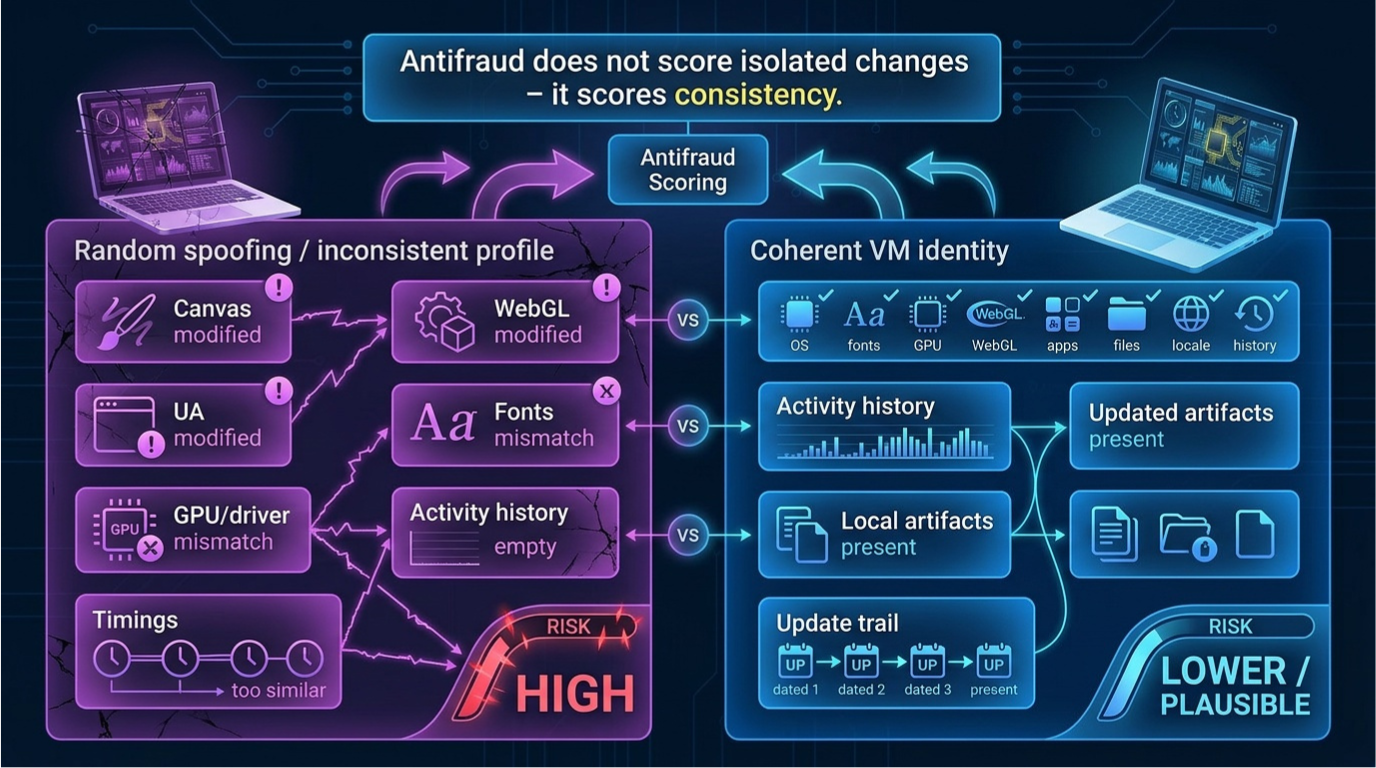
Anti-fraud rarely "bans on a single flag." More often it's a scoring model where everything matters at once: from visual Canvas/WebGL fingerprints to subtle system details. If the signals don't align, the system concludes not that you're "bad," but that the profile is unnatural.
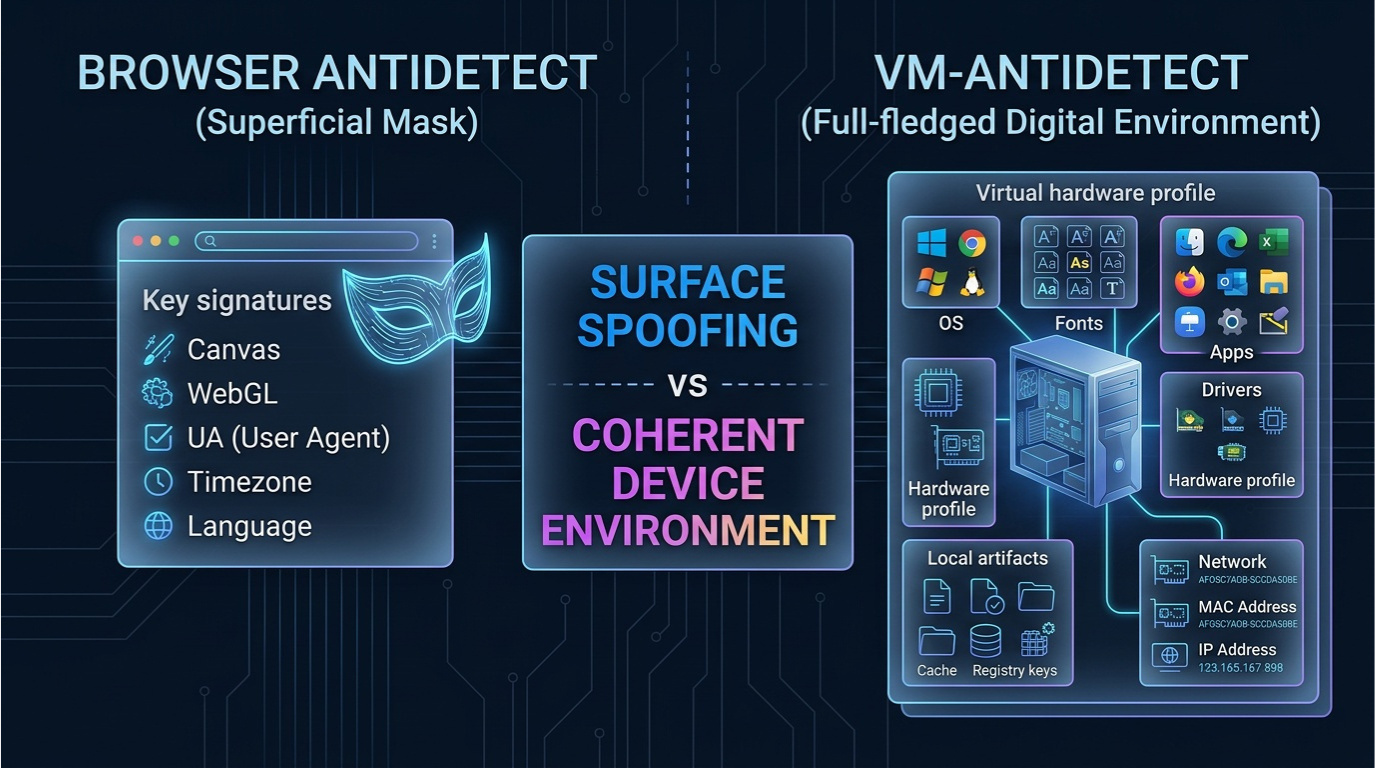
Browser antidetect is an approach that tries to "disguise" the browser without changing the device: Canvas and WebGL, User-Agent and client hints, WebRTC, timezone, language settings, sometimes superficial font manipulation.
VM antidetect plays by different rules. Instead of "spoofing the browser," it creates a separate environment: a separate OS, separate configuration, separate set of system artifacts. You get not a cosmetic mask, but a holistic digital identity.
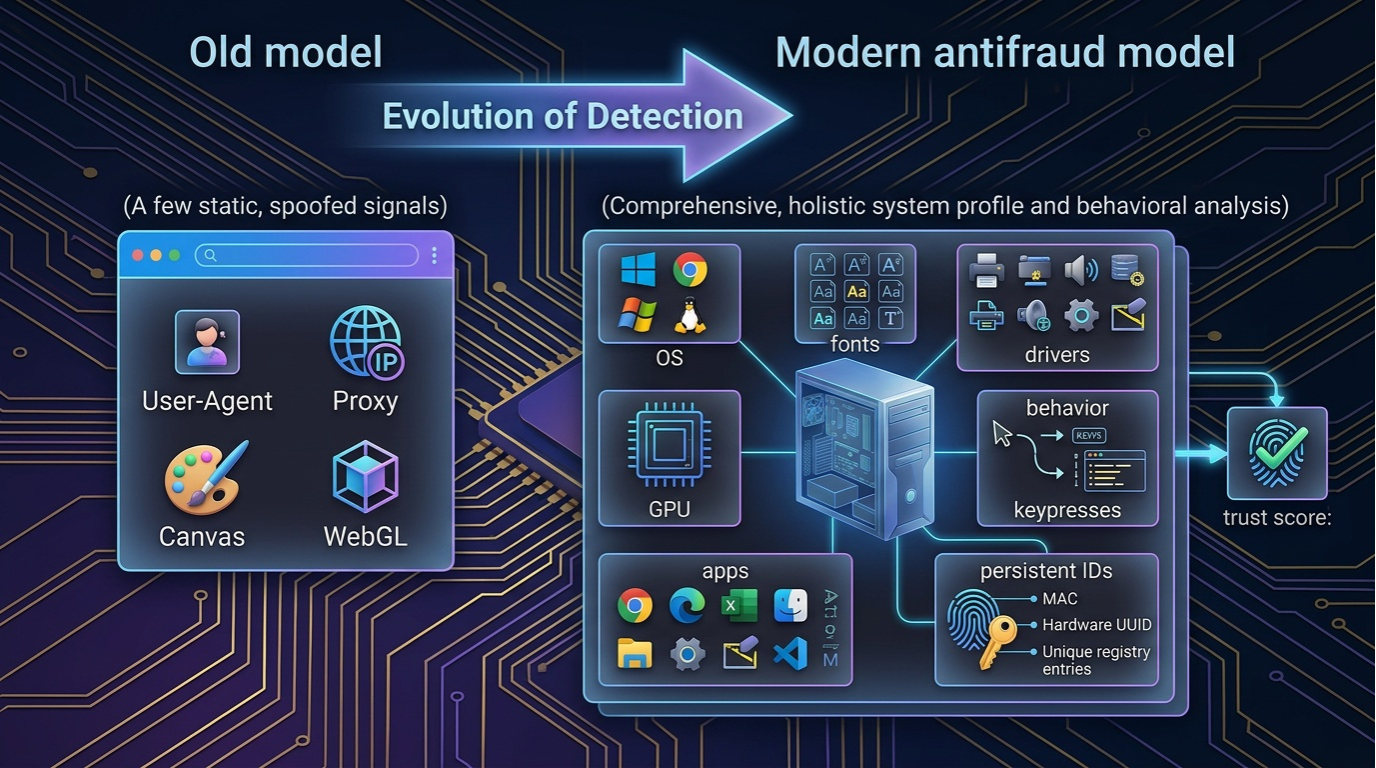
How Anti-Fraud Works: Fingerprint Layers from Browser to BIOS
Modern anti-fraud almost never relies on a single signal. It collects dozens and hundreds of indicators, cross-references them, and looks not for a "perfect fingerprint" but for inconsistencies.
The easiest way to think about detection is as a multi-layered cake. You can repaint the top layer (browser), but if the lower layers remain the same, the system will see that "the picture doesn't add up."
1) Browser Layer: What's Immediately Visible
- Canvas / WebGL (and their derivative rendering fingerprints)
- AudioContext, ClientRects, graphics processing quirks
- User-Agent and client hints
- Accept-Language, timezone, local settings
- WebRTC (IP leaks, ICE candidate behavior)
- TLS/JA3 (depends on stack and build)
2) System Layer: OS and Environment
- System font set and versions
- System locales and language parameters
- Rendering characteristics (how the OS draws elements)
- Timings and operation execution characteristics
- OS API traces, system policies
- Media stack and its behavior
3) Hardware Layer: Hardware and Drivers
- GPU and drivers, their typical combinations
- CPU characteristics, thread count
- Plausibility of the CPU — GPU — OS — drivers — WebGL chain
4) Platform Layer: Persistent Identifiers
- BIOS/UEFI fingerprint
- Serial numbers and device identifiers
- Virtualization indicators
- Installed application traces
- Telemetry and long-lived artifacts
Browser solutions are strong at the first layer and sometimes partially touch the second. VM antidetect, when properly configured, covers layers 1–3 more consistently.
Browser Antidetect: Capabilities and Limitations
What Browser Antidetect Does Well
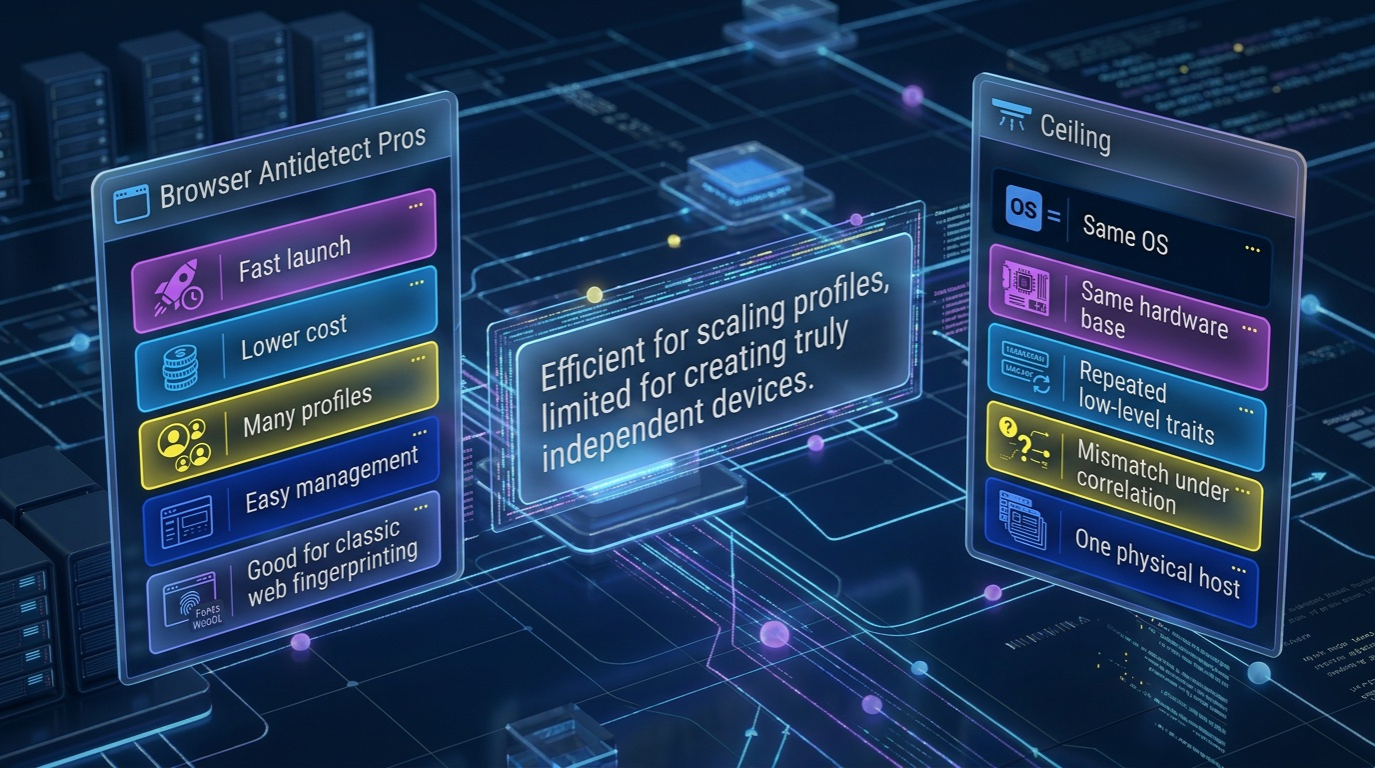
- Quick start and low barrier to entry — creating a profile takes just a couple of minutes
- Resource efficiency — one computer handles dozens or hundreds of profiles
- Convenient mass management — folders, tags, cookie import/export, team workflows
- Handles the "classic" web fingerprint well — Canvas, WebGL, User-Agent
Where the Ceiling Begins
The problem with the browser approach isn't that it's "bad." The problem is that it's architecturally limited: spoofing happens in the browser, but beneath the browser sits the same computer.
- Canvas/WebGL look like a different device, but system fonts and OS traces hint at the original host
- User-Agent declares one thing, while timings, API behavior, and rendering say another
- Profiles seem different, but too many low-level indicators remain identical
You cannot create 100 independent devices while staying within one physical computer unless you change the environment at the OS and hardware level.
VM Antidetect: How a Virtual Machine Creates a "Real New Device"
If browser antidetect is an attempt to "repaint" the fingerprint within one computer, the VM approach creates a new environment where the fingerprint forms naturally.
VM Is a Separate OS with Its Own "Ecosystem"
When you spin up a virtual machine, you get not a browser profile but a separate operating system:
- System files, services, and OS policies
- Environment configuration, locales, language packs, timezone
- System font set, libraries, and components
- Installed applications and "lived-in" artifacts
- Drivers, virtual hardware
- Network stack and network configuration
Key Advantage: Identity Integrity
The main advantage is not "more settings" but more consistency. If a device declares a specific GPU and driver, WebGL parameters naturally fit them. If the OS is "lived-in" — this is confirmed by fonts, libraries, and applications.
What About Virtualization Detection?
Yes, virtualization detection is sometimes attempted. But in real scoring models, what matters isn't the fact "VM or not VM" but how plausible the environment looks and how stable the fingerprint behaves. A VM can be noticeable, but when properly configured, it often looks more natural to the system than a browser profile with contradictions.

Browser vs VM Antidetect Comparison
To clearly see the difference between approaches, we compiled key criteria into one table.
| Criterion | Browser Antidetect | VM Antidetect |
|---|---|---|
| Spoofing Depth | Mainly browser fingerprints (Canvas/WebGL/UA) | Browser + OS + environment (fonts, apps, drivers) |
| OS/Hardware Identifiers | Often remain 'real' | Separate environment with different OS is created |
| Installed Apps | Not changed (OS level) | Can create clean system or specific software set |
| System Fonts | Partially spoofable, caught on inconsistencies | Fonts are set by the OS environment (more natural) |
| BIOS / Low-Level Traces | Usually not affected | Higher consistency (depends on VM implementation) |
| Signal Coherence | Difficult with many profiles on one host | Easier to achieve consistent 'device portrait' |
| Detection Resistance | Good against simple checks, drops with deep correlation | Usually higher with proper configuration |
| Resources and Cost | Cheaper: one PC handles many profiles | More expensive: CPU/RAM/disk, sometimes servers needed |
| Scalability | Easier by profile count | Harder, but scales infrastructurally |
What Browser Antidetect Doesn't Spoof: Installed Apps, Fonts, BIOS
If the comparison needs to be explained in one argument: the browser approach effectively spoofs upper-level web signals but often leaves the device's system foundation untouched.
Installed Apps
Anti-fraud evaluates the environment indirectly: through the presence and behavior of system handlers, runtime layers, multimedia components. A browser profile doesn't change the OS. 300 profiles on one host — one set of installed software. VM lets you build the environment like a constructor.
System Fonts
Fonts are one of the most persistent fingerprint signals. Browser spoofing often breaks on details: rendering differences, mismatches like "declared OS is one, but font set looks like another." In a VM, fonts are part of the OS.
BIOS Fingerprint and Hardware Traces
BIOS fingerprint is a class of low-level identifiers. Browser antidetect almost never affects this layer. VM doesn't provide "magical invulnerability," but it changes the device model at the virtualization level and increases overall signal consistency.
Fingerprint Consistency: Why "Random Spoofing" Is Worse Than a "Plausible Story"
In modern anti-fraud, what matters is not only which parameters you spoofed but also how plausibly they combine with each other.
How the Browser Approach Typically Gets Caught
- Timings and system response are too similar between profiles — all live on the same host
- Identical system "traces" across dozens of profiles: fonts, locales, environment elements
- GPU — driver — WebGL chain doesn't match: the browser tells one story, the environment confirms another
- Zero or identical "lived-in" state: sterile environment or identical artifact set
Why VM Provides a More "Natural" Picture
The VM approach lets you build not a set of spoofs but a complete device portrait: OS and its settings, user and work traces, local files, cache, update history, application set, more coherent hardware-driver-browser fingerprint chain.
Detection Resistance in Practice: Where Browser Antidetect Starts Failing
While you work on "simple" platforms, browser antidetect can show excellent effectiveness. Problems begin where anti-fraud matures.
What Breaks the Browser Approach on Strong Anti-Fraud
- OS environment correlation — browser signals claim one thing, system indicators say another
- Suspicious similarity of dozens of profiles on one host: timings, JS peculiarities, shared artifacts
- "Unspoofable" identifiers — a set of persistent signals difficult to change without switching environments
- Behavioral statistics — click patterns, typing speed, mouse movements
- Hardware-driver-rendering coherence — "does this look like a real device?"
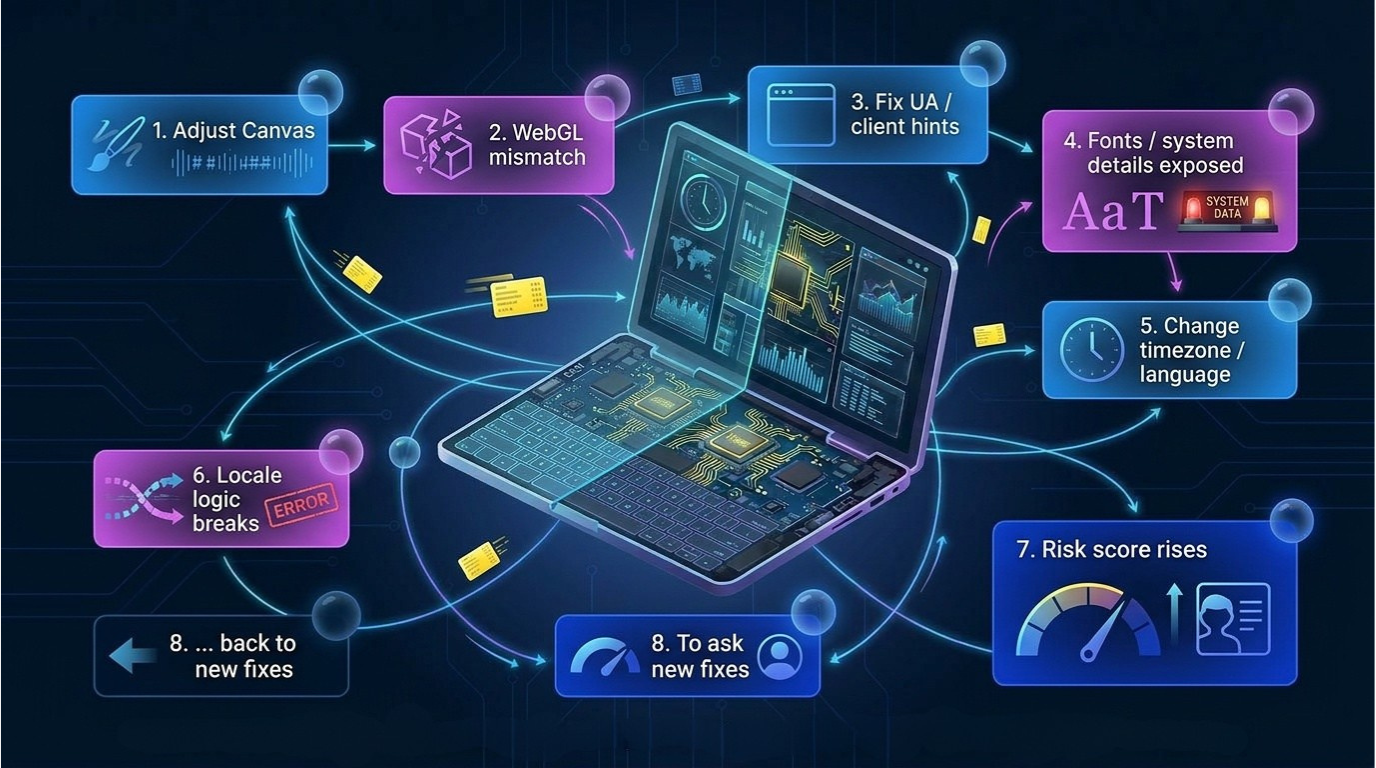
The Endless "Fix One Thing — Break Another" Cycle
In practice, browser antidetect becomes a balancing game: tweak Canvas — WebGL breaks, fix UA — fonts surface, change timezone — locale logic breaks. It's fighting symptoms because the environment stays the same.
Case Study: Why Vektor T13 Switched from Browser Antidetect to VM
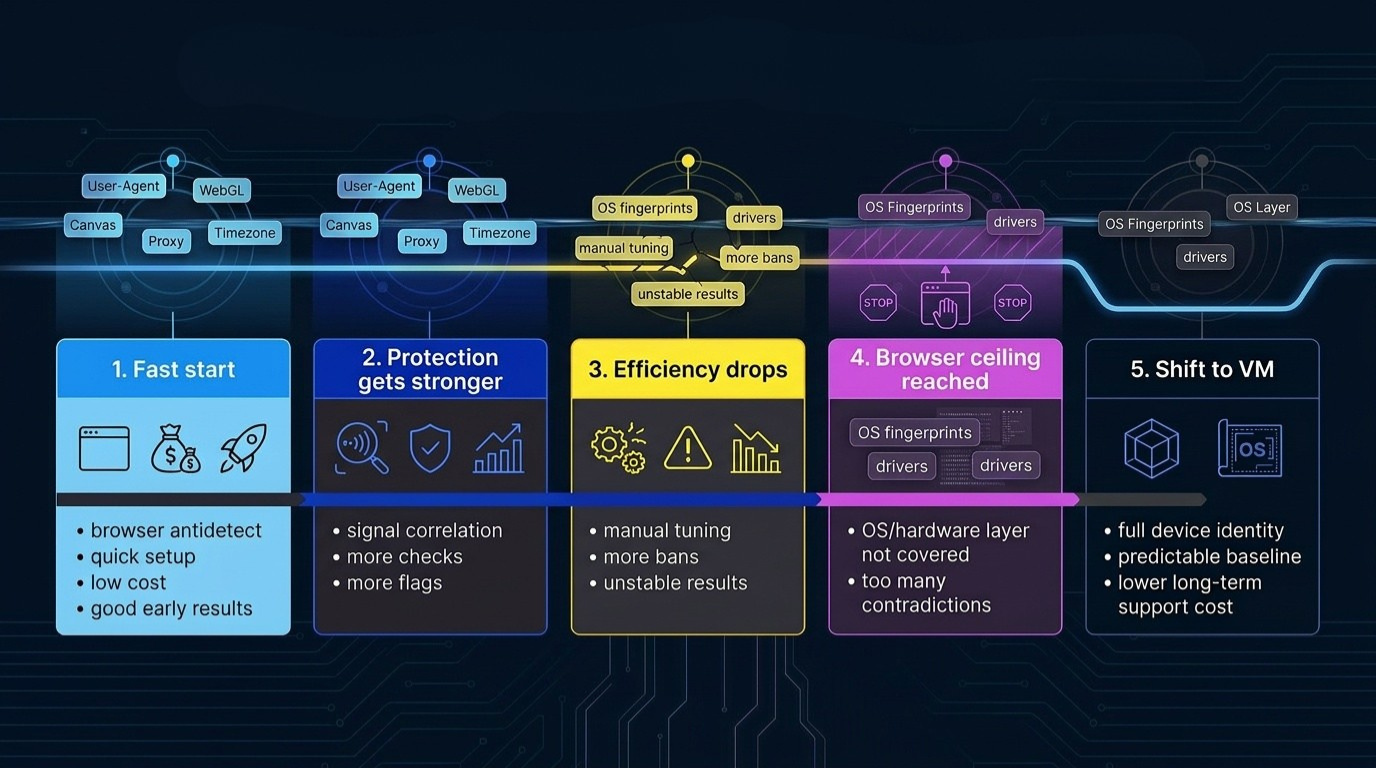
Vektor T13 (Dmytro Momot) himself started with browser antidetect — and that makes sense: at the start, this approach deploys faster, scales easier, and gives a sense of control.
But then platforms strengthen their defenses, and anti-fraud stops looking at fingerprints as a set of independent parameters. The browser approach faces not a single error but a decline in overall effectiveness:
- Everything works great at first. Profiles differ by Canvas/WebGL/UA, proxies are selected, basic checks show "normal"
- Defenses start correlating signals. Environment coherence comes into play: OS, fonts, system artifacts, timings
- Effectiveness drops over distance. Additional checks, flags, and unstable scenarios increase
- Browser-layer spoofing can't cover OS and "hardware" level. Dozens of profiles on one host retain common system indicators
- Switching to VM becomes a practical solution. VM changes not only the top fingerprint layer but the environment that confirms that fingerprint
Cost and Complexity: Why VM Isn't Always "Better" but Is Usually "Stronger"
Why VM Is Almost Always More Expensive to Operate
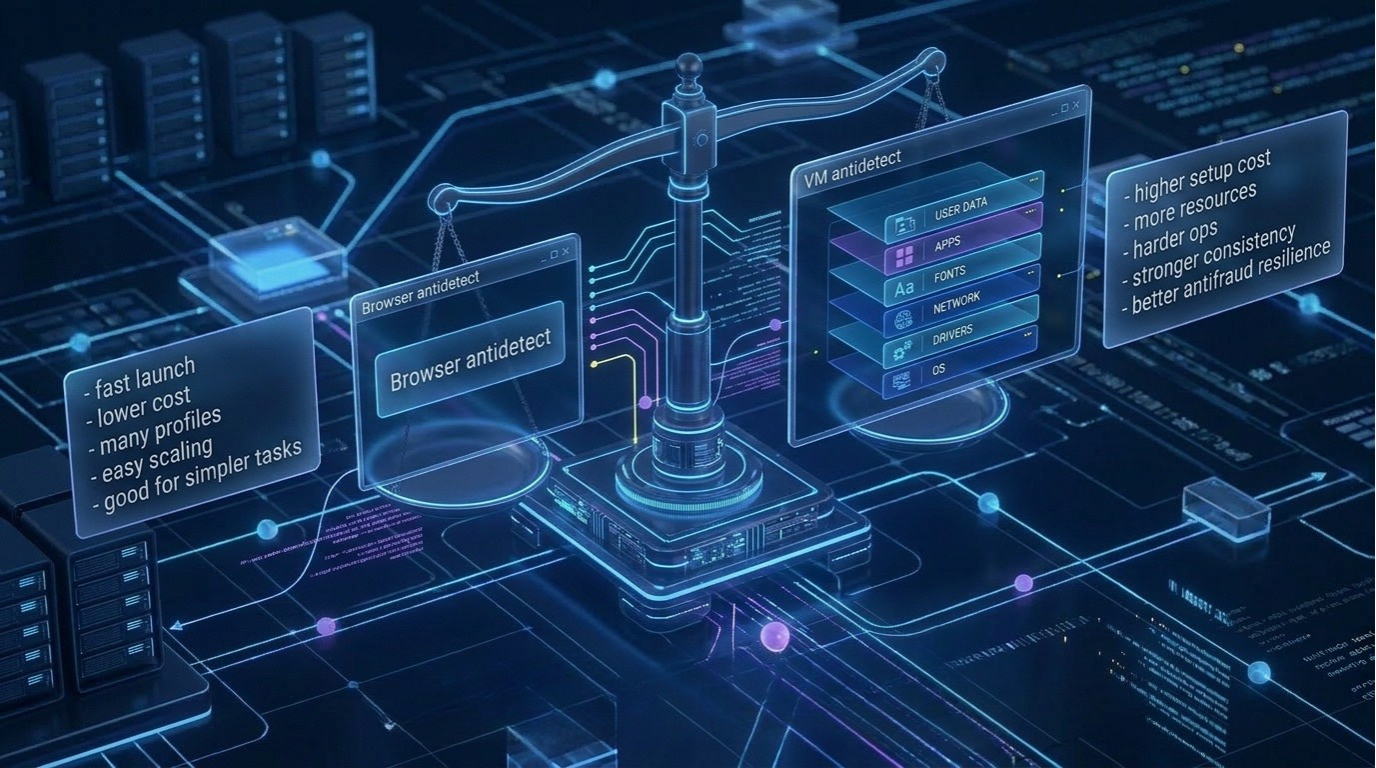
- Resources: VM "consumes" hardware honestly. A separate OS with its own processes, memory, and disk
- Higher barrier to entry. Managing base images, OS versions, updates, drivers, network modes
- Discipline required. Careful snapshot management, image "cleanliness" control
- Harder to scale. VM requires powerful hardware or distribution across multiple hosts
When Browser Antidetect Remains an Excellent Choice
- Tasks don't require deep anti-fraud passing
- Launch speed and profile count matter more
- No existing infrastructure for VM
Browser antidetect optimizes for scale; VM optimizes for resilience.
How to Choose: A Practical Framework
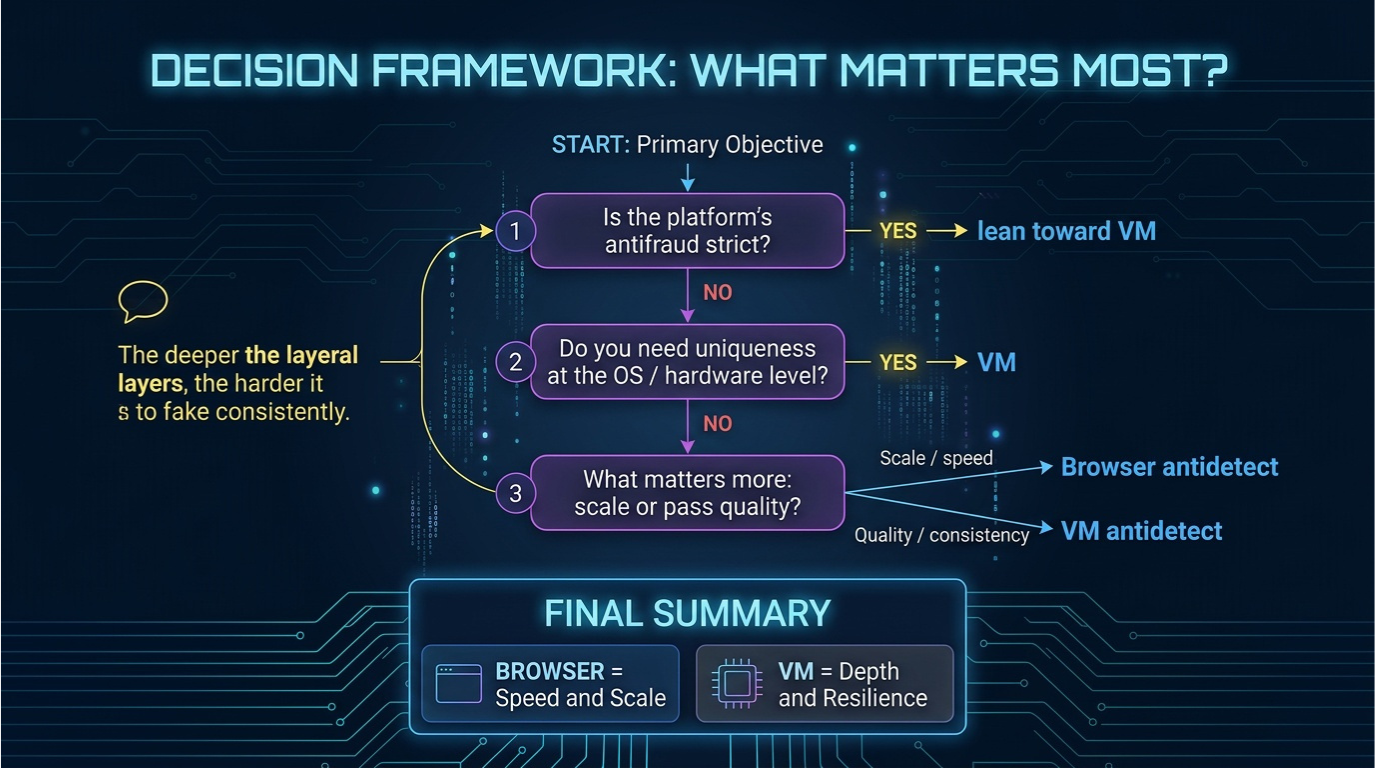
1) How strict is the platform's anti-fraud?
Basic protection → browser antidetect is often sufficient. Strict protection → VM usually provides a more resilient foundation.
2) Do you need OS and hardware-level uniqueness?
"Different browsers" are enough → browser approach. Need "different devices" → VM.
3) What matters more: scale or pass quality?
Browser antidetect — speed and density: many profiles on one host.
VM antidetect — quality: resilience, consistency, predictability.
Which Antidetect to Choose: VM or Browser
Browser antidetect remains a working tool, but it's important to understand its boundaries. It mainly affects the top fingerprint layer: Canvas, WebGL, User-Agent. This is enough as long as the platform checks "browser as browser" and doesn't build a deep device model.
But as soon as anti-fraud starts correlating signals between layers, the approach's weak spot emerges: the system foundation remains the same. OS and hardware-level indicators, system fonts, installed software traces, and other long-lived artifacts come into the defense's view.
VM antidetect solves the problem differently: it creates a full-fledged environment where uniqueness is formed not by cosmetics on top of the browser but by the entire environment as a whole. A separate OS, its own artifact structure, its own system components, and a more coherent hardware-driver-rendering-local settings chain deliver what strong anti-fraud systems value most: consistency.
VM-based antidetect. 300,000+ unique identity combos. Free edition available.
