Most people think anti-fraud is just an IP address blacklist and a couple of browser checks. In reality, it's far more complex.
Dmytro Momot (Vektor T13) — founder of Detect Expert, antidetect system developer, and anti-fraud researcher — has spent over a decade studying this field from both sides: how defense systems are built and how they break.
Anti-fraud doesn't catch you by a single indicator. It builds a picture — and evaluates how plausible it is.
— Dmytro Momot, Vektor T13
What Anti-Fraud Really Is
Anti-fraud is not a filter. It's a correlation system.
It doesn't look for one "forbidden" parameter. It collects dozens of signals simultaneously, compares them to the norm for your behavior type, cross-references with history — and calculates a final trust assessment (Trust score / Fraud score).
There is no universal model. A bank evaluates a transaction in milliseconds and prioritizes network signals. An ad platform analyzes the entire session — behavioral patterns matter more. A marketplace combines both approaches.
Three Questions the System Asks Every Time
01 — Who are you from an infrastructure perspective? Network, provider, connection type, routing, geography.
02 — What environment represents you? Browser, digital fingerprint, graphics, plugins, API traces.
03 — How consistent are you over time? Signal stability between sessions, change history, behavioral patterns.

Four Levels That Form the "Risk Picture"
| Level | What Is Analyzed | Why It Matters |
|---|---|---|
| Network | IP, ASN, VPN, geolocation | First and fastest filter |
| Browser | Canvas, WebGL, fonts, locale | Distinguishes real environment from a mask |
| OS | Identifiers, language, system time | Catches inconsistencies between parameters |
| Hardware | GPU, CPU, sensors, timings | The stickiest layer — hardest to fake |
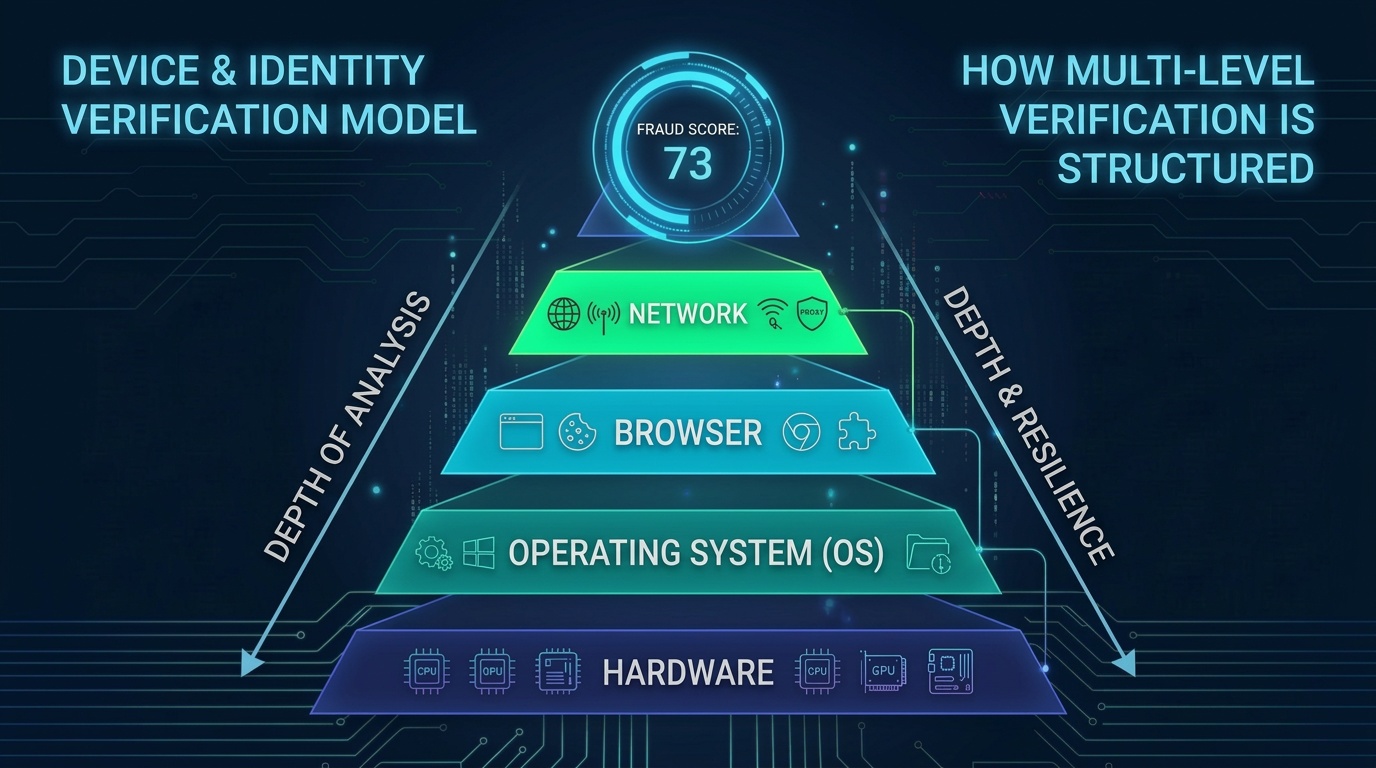
The output is two numbers: Fraud score (risk right now) and reputation rating (trust over time).
Network Level: IP, ASN, VPN/Proxy Detection and Geography
The network is what anti-fraud sees before your browser even renders the page. No scripts, no complex checks — just looking at where the request came from.
What Anti-Fraud Sees at the Network Level
IP address and its reputation. Every IP has a history. The system checks: has it been seen in botnets, spam, carding? How often does it appear in requests from different accounts?
ASN and provider. ASN is your network's "passport." It tells anti-fraud who owns the address range.
| Provider Type | How Anti-Fraud Perceives It | |
|---|---|---|
| Home ISP | Regular user. Expected scenario. | Low risk |
| Mobile Network | Natural traffic, often dynamic IP. | Low risk |
| Corporate Segment | Acceptable, but may be VPN-related. | Medium risk |
| Datacenter | Regular users don't browse from servers. | High risk |
Network Types: Residential / Mobile / Datacenter
- Residential (home) — the most "natural" type. IP belongs to a real ISP
- Mobile — dynamic, frequently changing. Systems account for the fact that mobile IPs may be shared by many people
- Datacenter (server) — unusual for regular users. Logging into a marketplace from an AWS IP raises immediate questions
Geolocation and Its Plausibility
- Region and city — does it match previous logins?
- Timezone — does it match the declared geolocation?
- Interface language — is it logical for someone in Berlin to use a browser in Portuguese?
- Travel speed — was in Moscow, logged in from Brazil 20 minutes later? Physically impossible
VPN / Proxy Detection
- Known VPN and proxy databases
- Server network signatures
- RTT and routing analysis — response time may not match the declared location
- Behavioral correlations — many different "users" with similar characteristics
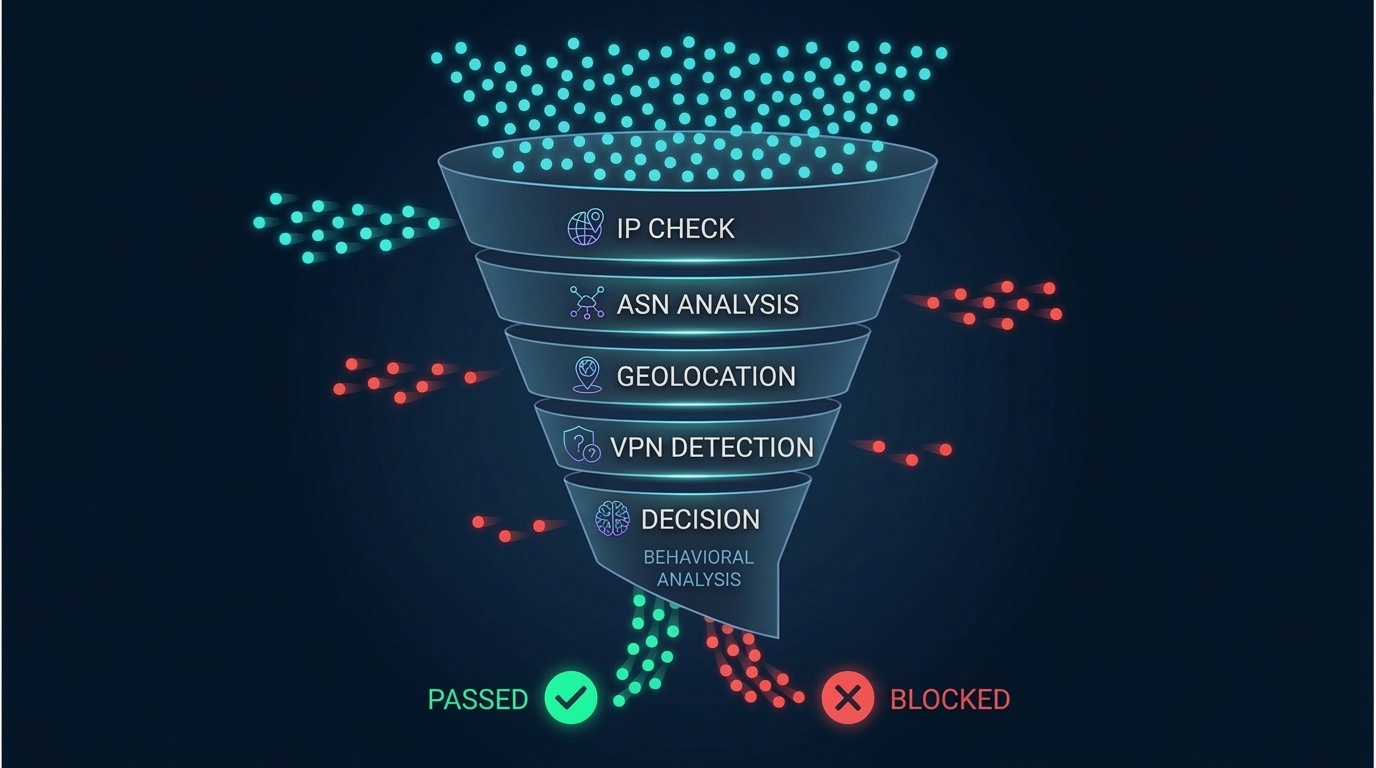
| What Happens | Why It's Suspicious | |
|---|---|---|
| 50 accounts from one ASN | One infrastructure = one farm | |
| Logins repeat time patterns | Automation or single operator | |
| Geography changes faster than a flight | Proxy switching, not real travel | |
| Datacenter IP in consumer scenario | No reason to shop from a server |
Browser Level: Canvas, WebGL, Fonts and the Session's "Digital Skin"
If the network level answers "where did you connect from," the browser level answers a different question: "what device represents you".
What Makes Up a Digital Fingerprint
Canvas fingerprint — when a site asks the browser to draw a hidden image, the result depends on the GPU, drivers, and OS settings. Two devices almost never draw the same picture.
WebGL fingerprint — a 3D rendering fingerprint. Often reveals the GPU + driver + OS combination. If you claim macOS but WebGL shows a Windows driver — that's a conflict.
Fonts and rendering metrics — which fonts are installed, how they render, character width/height/kerning. High entropy.
AudioContext — a unique audio signal processing fingerprint. Tied to audio chip physics — plausible faking is difficult.
User-Agent and Client Hints — platform, architecture, browser version. The key is consistency between them.
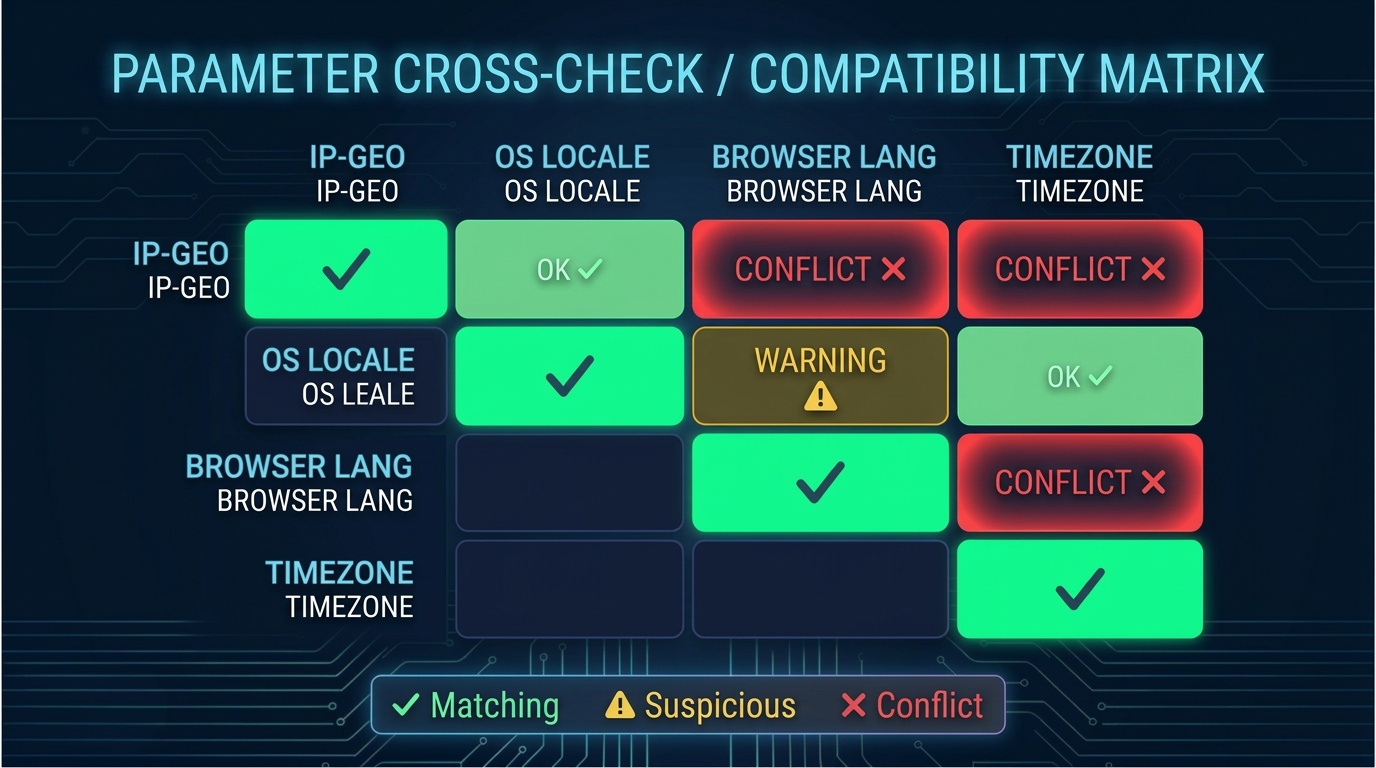
Timezone / Locale / Language — user is "from Germany" but timezone is UTC+7, language is Portuguese, date format is American? Three red flags.
Extensions and API traces — traces of Selenium, Puppeteer, Playwright. The attempt to hide automation itself becomes a signal.
What Anti-Fraud Actually Looks For: Inconsistencies
| What Is Declared | What the System Sees | Result |
|---|---|---|
| macOS in User-Agent | NVIDIA Windows driver in WebGL | Conflict |
| German geolocation | Browser language is Vietnamese | Conflict |
| Chrome 120 | API set matches Chrome 95 | Conflict |
| Mobile device | 1920x1080, no touch events | Conflict |
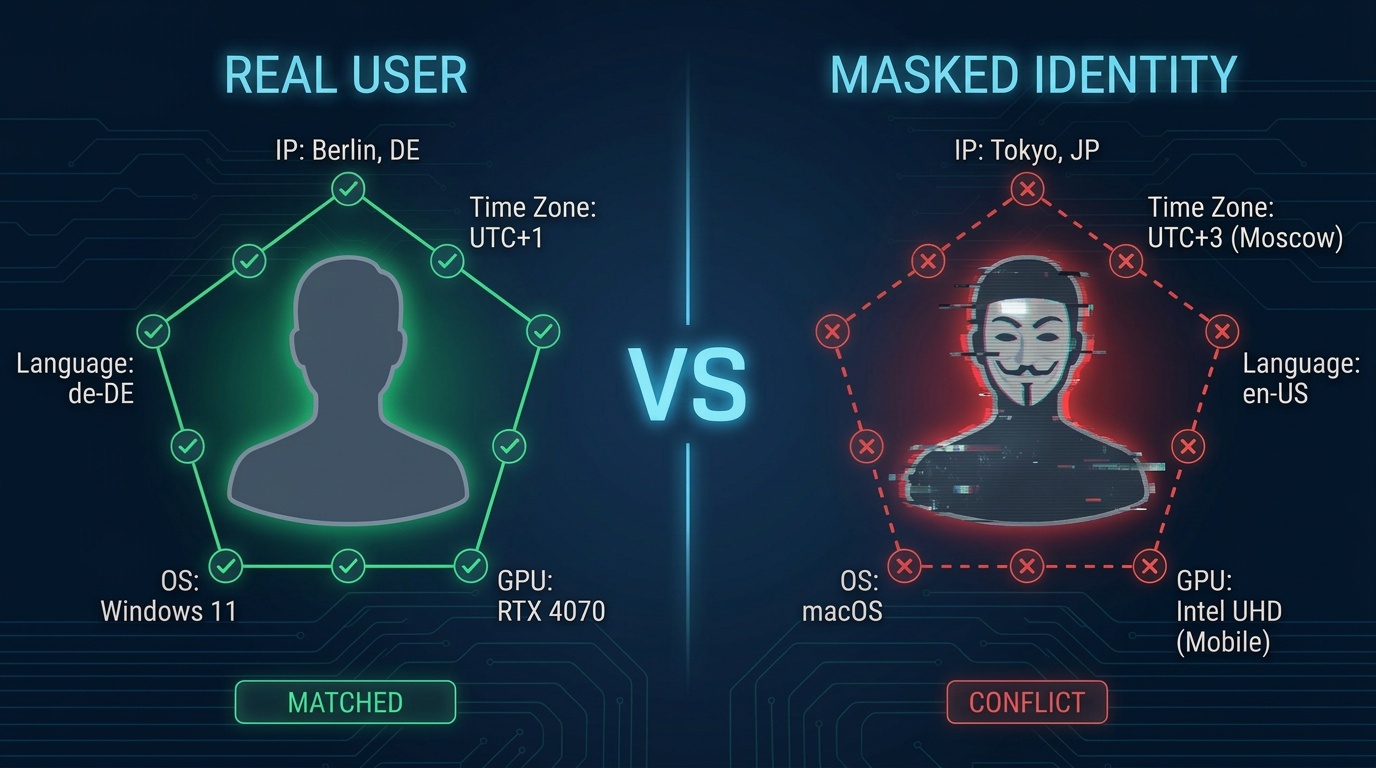
Real devices are imperfect. And it's precisely this imperfection that makes them plausible.
OS Level: Identifiers, Languages and System Consistency
When the base risk is already elevated, anti-fraud starts asking: "How does the OS manifest through the environment — and does this match what the browser declared?"
This is the level where contradictions most often arise. Masking a browser is relatively simple. Making the entire operating environment look plausible is much harder.
Persistent System Markers
| What Leaks | How It's Used | |
|---|---|---|
| System parameter combinations via JS API | Forms a persistent environment snapshot | |
| System timer behavior | Distinguishes real OS from virtualization | |
| System call processing specifics | Identifies OS type and version | |
| File system characteristics (indirect) | Indicates a virtual machine |
Runtime Environment Behavior
- Which APIs are available, which are restricted — real Windows 11 and emulated respond differently
- Operation speed — VM and real hardware produce different timings
- JavaScript peculiarities — differences in number rounding, Unicode handling, Intl API behavior
- Virtualization traces — patterns in performance, memory behavior
Language and Regional Settings
- OS Locale — primary system language and region
- Keyboard layouts — can reveal more than the declared language
- Number and currency format — dot or comma, currency symbol
- Date format — MM/DD/YYYY or DD.MM.YYYY
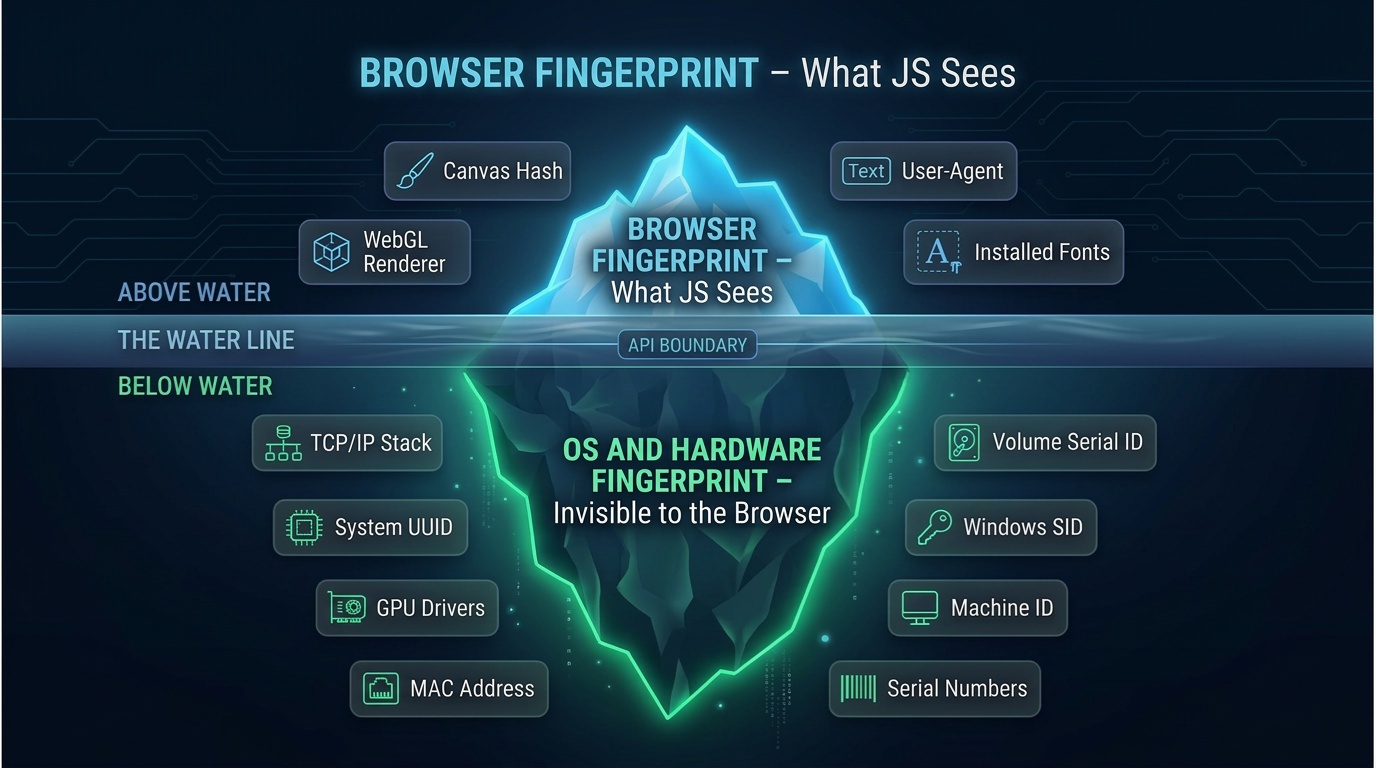
Anti-fraud doesn't look for lies. It looks for incoherence — when different parts of the environment tell stories about different people.
— Dmytro Momot, Vektor T13
| Browser Declares | OS Shows | What Anti-Fraud Sees |
|---|---|---|
| macOS 14, Safari | Windows timings and API behavior | Emulation |
| German locale | Russian layouts, Cyrillic encodings | Manual configuration |
| High-performance CPU | Virtual machine micro-delays | Virtualization |
Hardware Level: GPU, CPU, Sensors and Timings
The three previous levels can be configured or spoofed to varying degrees. But beneath them lies physical hardware. And it leaves traces that are extremely difficult to control.
GPU: The Graphics Processor as a Fingerprint
| What Is Analyzed | Why It Matters | |
|---|---|---|
| Vendor and Renderer | Exact GPU model and driver | |
| Rendering Performance | Each GPU model produces a characteristic curve | |
| Computation Precision | Micro-differences depend on chip architecture | |
| WebGL Extensions | Set is unique per GPU + driver + OS combination | |
| Render Test Results | Two GPUs never draw identical pictures |
You can spoof the string "NVIDIA RTX 4090" to "Intel UHD 620." But making a powerful GPU behave like a weak one is impossible.
CPU: Timings and Micro-Characteristics
- Core count — if 2 are declared but parallel operations execute at 16-core speed — conflict
- Micro-benchmarks — each CPU architecture produces its own "performance profile"
- System call timings — depend on the actual processor
- performance.now() precision — VMs exhibit characteristic patterns
Sensors: Gyroscope, Accelerometer, Battery
- Gyroscope and accelerometer — a real phone in hand always moves slightly. An emulator doesn't
- Battery API — device is "mobile" but battery is always 100%? Anomaly
- Touch events — real touches have characteristic "physics": pressure, contact area
Timings: Microseconds That Don't Lie
- Rendering timings — drawing speed depends on the real GPU
- Computation timings — a real iPhone 15 and an emulator produce different profiles
- Virtualization timing anomalies — periodic latency spikes
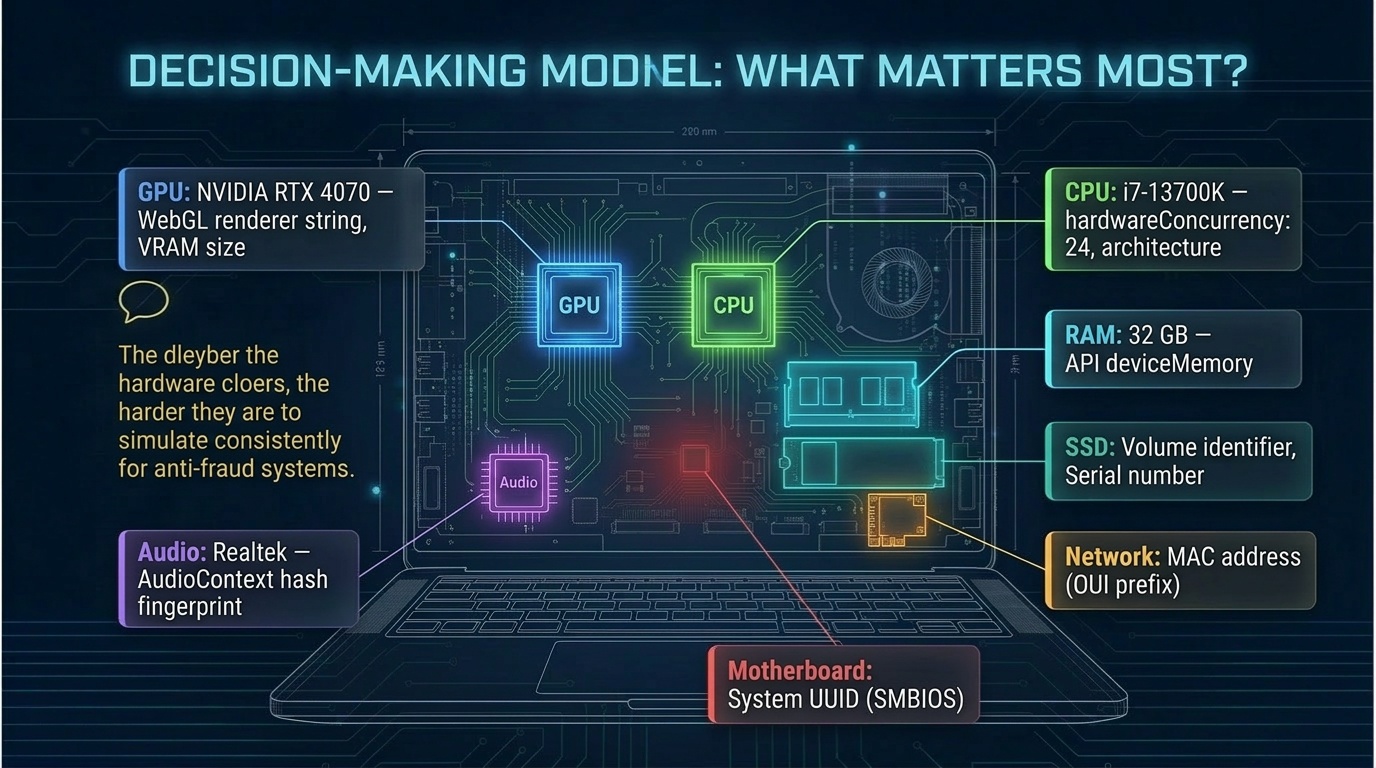
You can change an IP in a second. You can rebuild a browser profile in a minute. But making one piece of hardware behave like another is a challenge of an entirely different order.
Fraud Score and Reputation Rating: How the System Calculates the Result
All four levels merge into a single assessment. And it's more complex than "suspicious / normal."
Fraud Score: An Instant Risk Snapshot
| Factor | Weight | Example |
|---|---|---|
| Network anomalies | High | Datacenter IP + VPN signature |
| Browser conflicts | High | macOS in UA but Windows driver in WebGL |
| OS consistency | Medium | Locale doesn't match geolocation |
| Hardware timings | Medium | Virtualization indicators |
| Behavior | Variable | Form filled too quickly |
Fraud Score Thresholds:
- 0-20: Low risk. No additional checks
- 20-50: Medium risk. SMS, CAPTCHA, or enhanced monitoring
- 50-80: High risk. Functionality restrictions, transaction delays
- 80-100: Critical. Account block, fund freeze
Reputation Rating: Trust Over Time
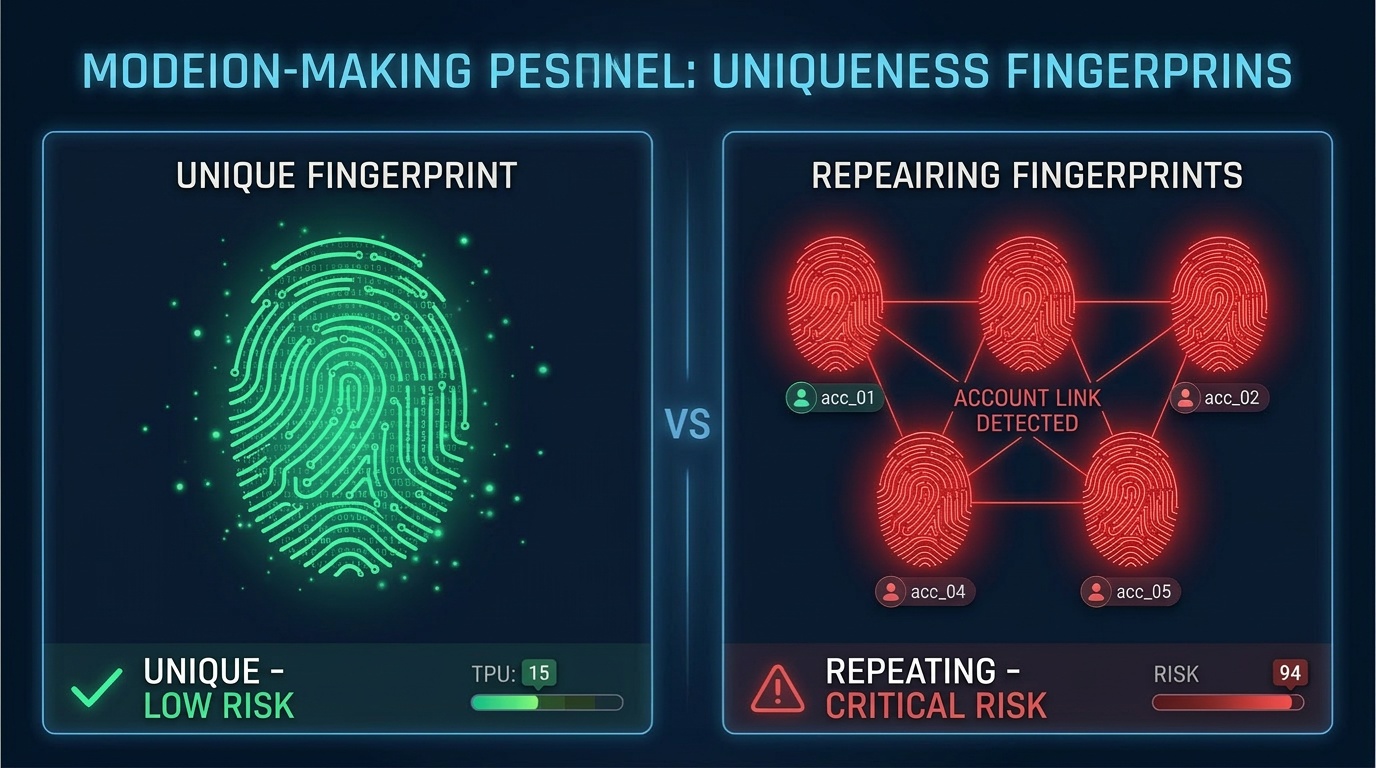
| Fraud Score | Reputation Rating | |
|---|---|---|
| Horizon | Single session | Weeks, months, years |
| What it measures | Risk of a specific action | Trust in the identity |
| What influences it | Current signals | History, stability, habits |
| How it changes | Instantly | Slowly, gradually |
| Analogy | Thermometer | Credit history |
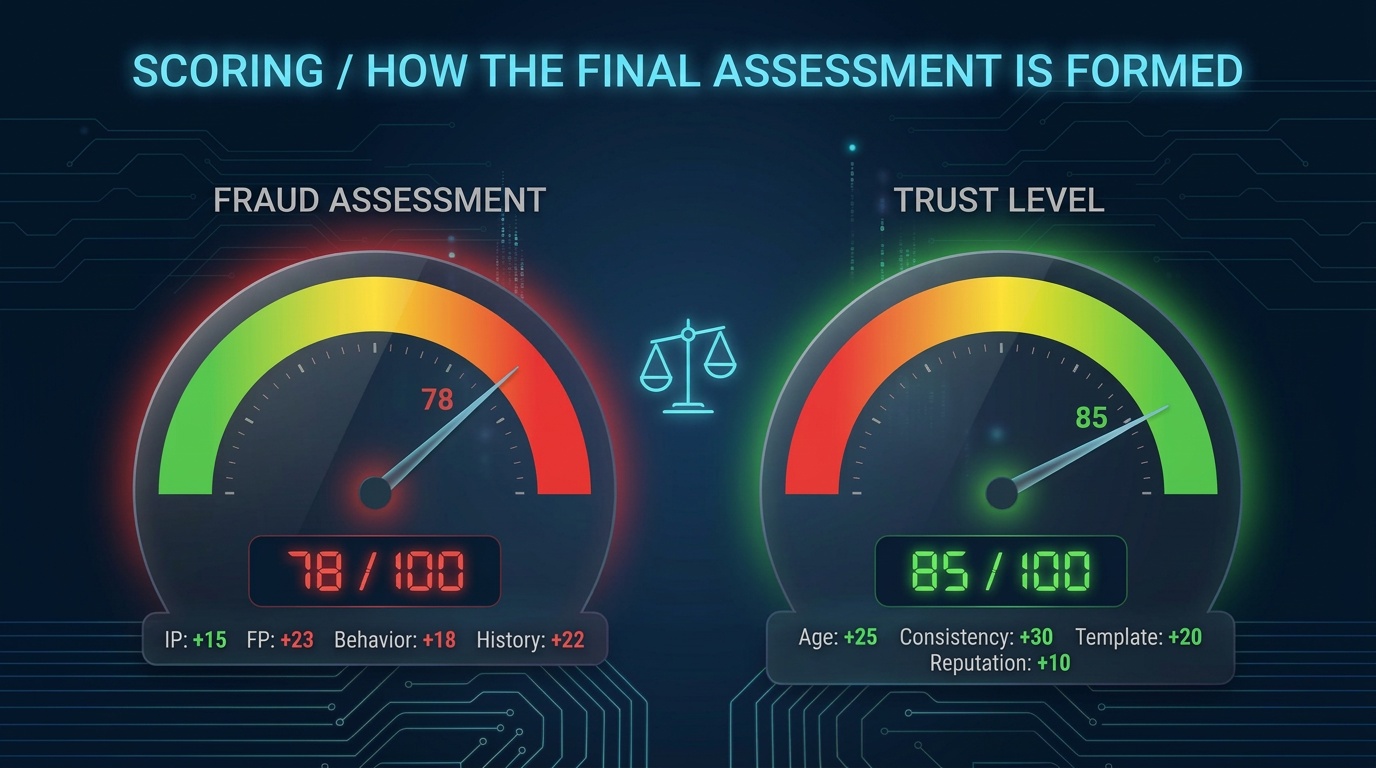
What builds reputation:
- Environment stability — same browser, OS, device month after month
- Geographic predictability — logins from one or two cities, at usual times
- No incidents — not a single disputed action in six months
- Usage patterns — regular purchases, normal navigation
- Account age — the longer without incidents, the higher the trust
- Social graph — connections to other verified accounts
Reputation cannot be bought or faked in a single session. It's built on behavioral consistency over time.
Why "Understanding Both Sides" Changes Everything
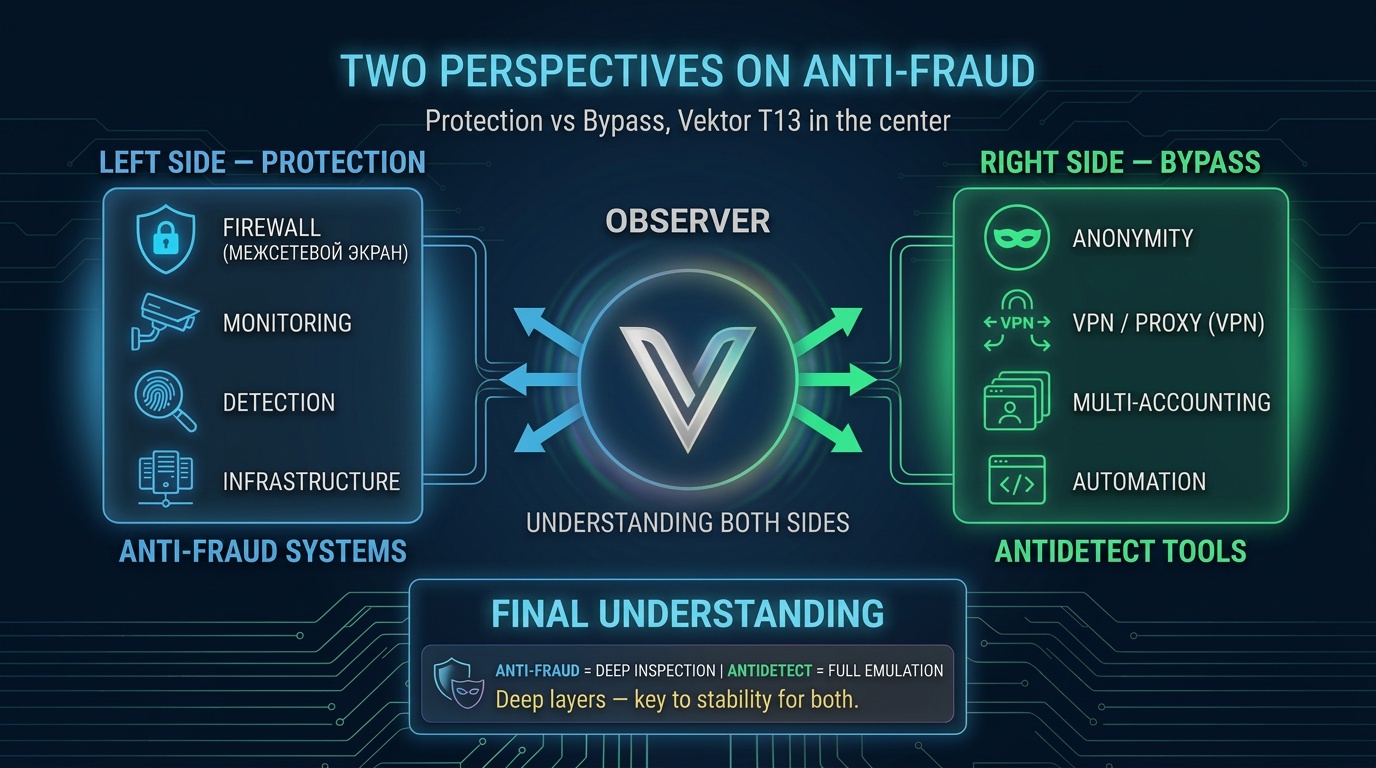
Most specialists look at anti-fraud from one side. Dmytro Momot (Vektor T13) is one of the few who consistently works from both sides of this equation.
How This Is Implemented in Practice
Antidetect System based on VirtualBox — full hypervisor-level virtualization: environment isolation, hardware fingerprint control, minimizing correlation between sessions.
IP Auditor — a professional tool for IP address and network reputation analysis — the same checks that anti-fraud performs, but accessible for analysis from your side.
FraudLab — training through the Detect Expert Academy. Structured knowledge: how anti-fraud systems work, detection methods, practical case studies.
Effective cybersecurity doesn't start with tools. It starts with understanding how systems work at a fundamental level.
— Dmytro Momot, Vektor T13
Conclusion
Anti-fraud is not one algorithm and not one filter. It's a multi-signal correlation system operating across four levels simultaneously:
- Network — where you came from
- Browser — what environment represents you
- OS — how consistent your environment is
- Hardware — what happens at the physical level
Each level adds context. None works in isolation — anti-fraud looks not for single errors but for inconsistencies between layers.
The output is two numbers: Fraud score (instant risk) and reputation rating (trust over time). Together they determine whether the system lets you through — or stops you.
This is how anti-fraud thinks. And this is how Vektor T13 thinks.
VM-based antidetect. 300,000+ unique identity combos. Free edition available.
