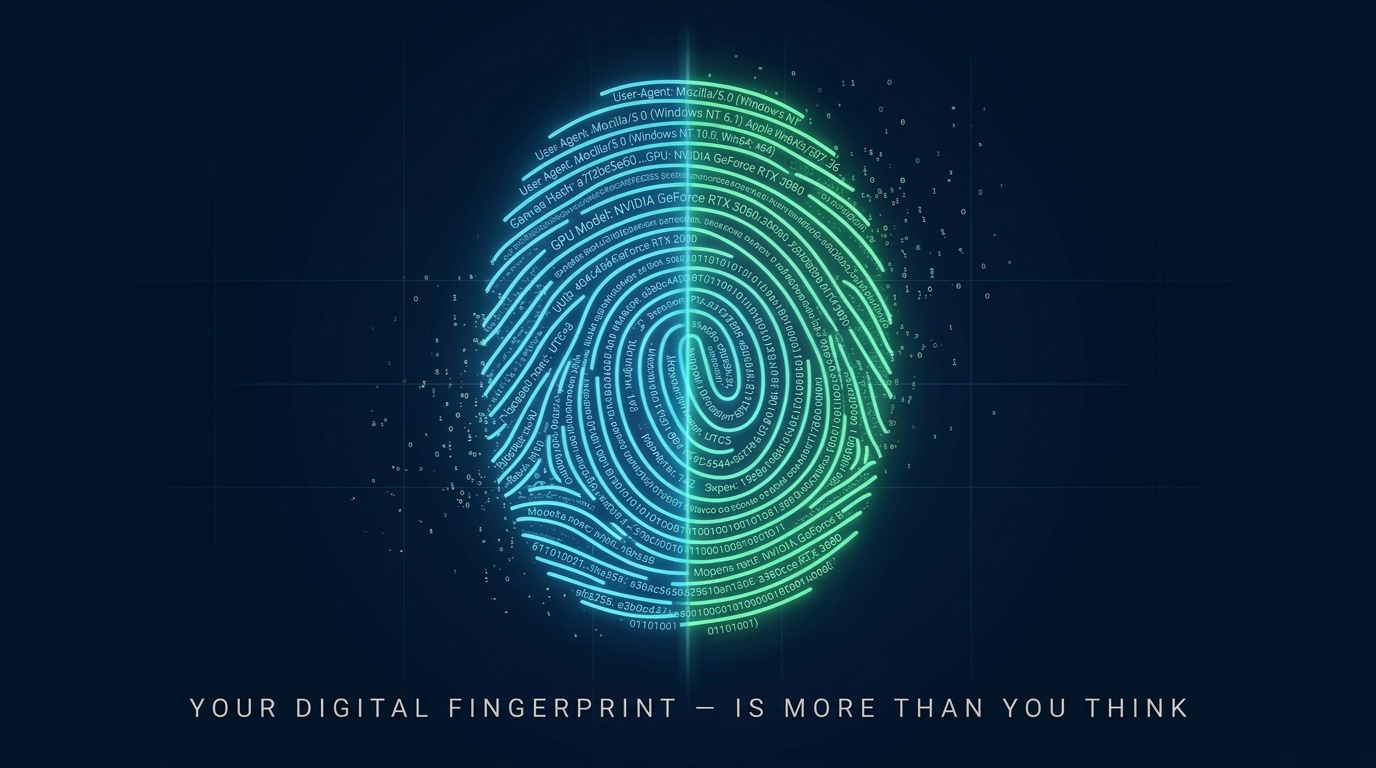
Every time you open a website, your device transmits dozens of parameters — from the graphics card model to the list of installed fonts. Individually, this data is harmless. Together, they form a digital fingerprint — a unique identifier by which anti-fraud systems recognize you without cookies, logins, or IP addresses.
In this guide — a complete reference of identifiers across three levels: hardware, operating system, and browser. For each — what it is, how to check it, and why anti-fraud needs it.
What Is a Digital Fingerprint and Why It's Collected
A digital fingerprint is a set of technical characteristics of a device and software environment that allows identifying a user without explicit identifiers like cookies or authentication.
Anti-fraud systems use fingerprints for:
- Account linking — determining that multiple accounts belong to one person
- Risk assessment — identifying suspicious configurations and automation
- Spoofing detection — finding contradictions between declared and actual parameters
- Behavioral analysis — tracking interaction patterns with the website
Important: no single parameter identifies a user. Uniqueness comes from the combination of dozens of parameters — and the more discrepancies between layers, the higher the risk score.
Level 1: Hardware — Hardware Identifiers
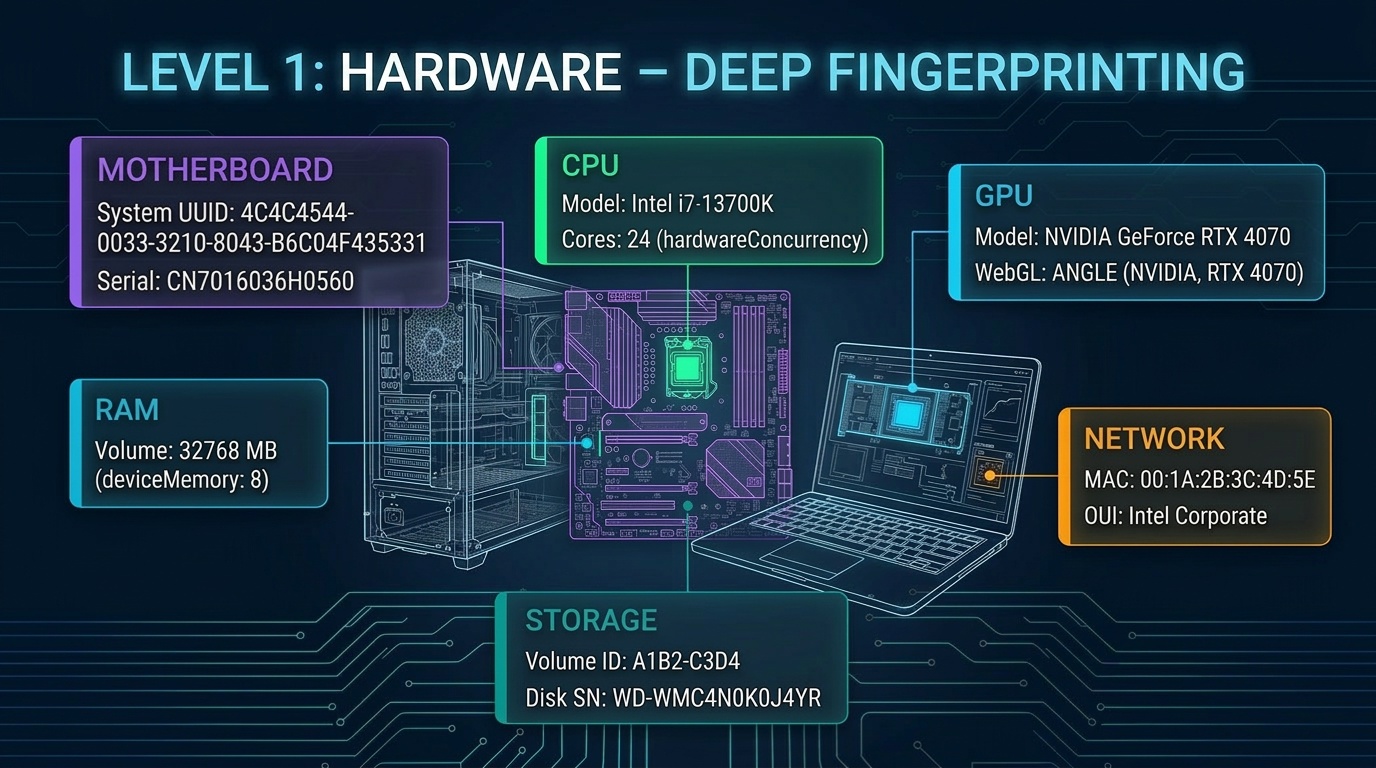
The deepest fingerprint layer. Hardware identifiers are tied to physical equipment and don't change when reinstalling the OS or switching browsers. This is why they are most valuable for anti-fraud systems.
System UUID (SMBIOS UUID)
What it is: A universal unique identifier stored in the motherboard's BIOS/UEFI. Format — a 128-bit string like 4C4C4544-0033-3210-8043-B6C04F435331.
How to check:
- Windows:
wmic csproduct get uuid - Linux:
sudo dmidecode -s system-uuid - macOS:
system_profiler SPHardwareDataType | grep UUID
What it gives anti-fraud: Direct binding to a physical device. If two accounts operate on a device with the same UUID — the system records a link. Spoofing UUID at the browser level is impossible.
Serial Numbers (Hardware Serial Numbers)
What it is: Unique serial numbers of components — motherboard, hard drive, processor, memory modules. Each component has its own SN.
How to check:
- Windows:
wmic baseboard get serialnumber(motherboard),wmic diskdrive get serialnumber(disk) - Linux:
sudo dmidecode -t baseboard | grep Serial - macOS:
system_profiler SPHardwareDataType | grep Serial
What it gives anti-fraud: The set of serial numbers creates a "hardware profile" of the device. Even when one component is replaced, the others persist.
MAC Address
What it is: A unique network adapter identifier. Format — 6 bytes: 00:1A:2B:3C:4D:5E. The first three bytes identify the manufacturer (OUI).
How to check:
- Windows:
getmac /voripconfig /all - Linux:
ip link show - macOS:
ifconfig en0 | grep ether
What it gives anti-fraud: MAC is accessible via WebRTC. Anti-fraud checks OUI match against real manufacturers. A random MAC with a non-existent OUI is a spoofing marker.
GPU (Graphics Card)
What it is: Graphics processor model and parameters — determined through WebGL and system APIs.
How to check:
- In browser:
chrome://gpuorabout:support(Firefox) - JavaScript:
gl.getParameter(gl.RENDERER)in a WebGL context
What it gives anti-fraud: GPU affects Canvas and WebGL rendering results. Mismatch between the declared model and actual rendering is a key signal.
Level 2: OS — Operating System Identifiers
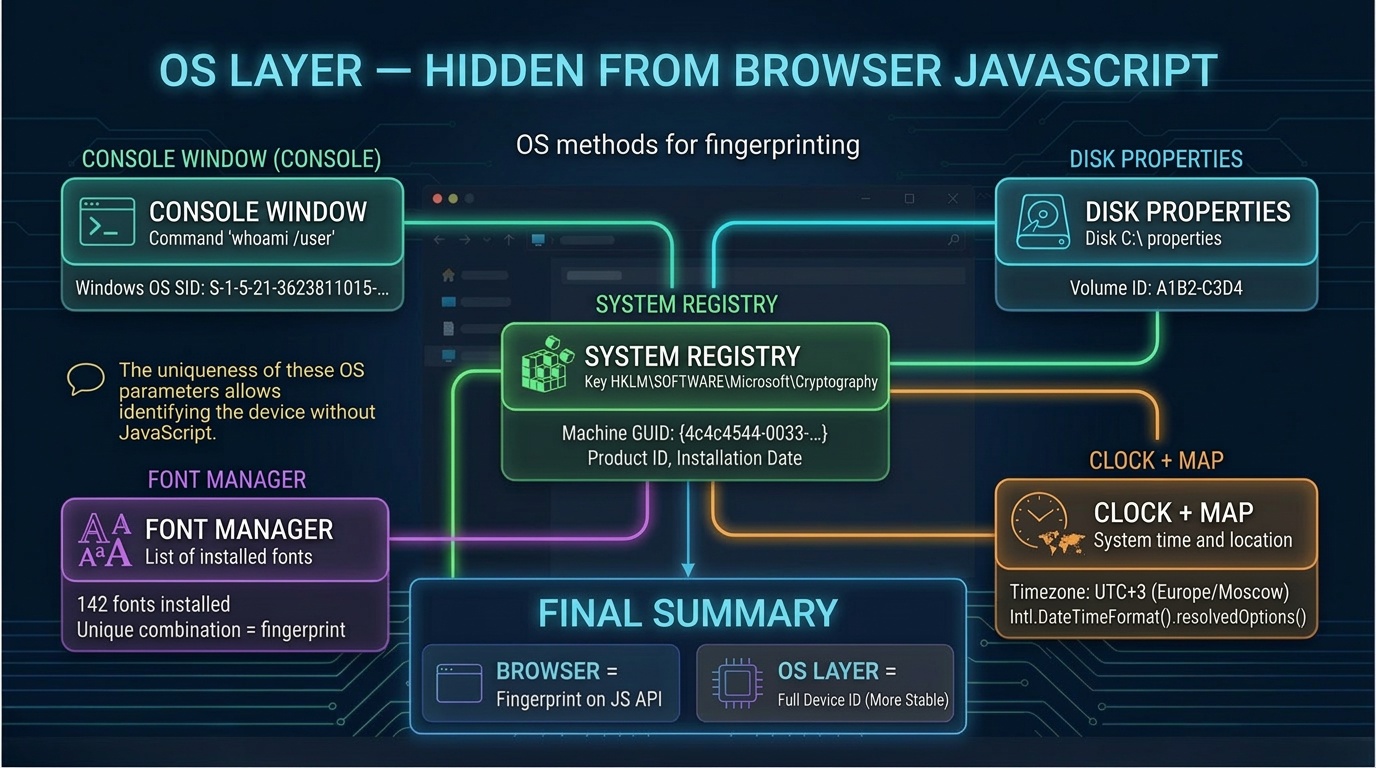
The middle fingerprint layer. OS parameters are less stable than hardware ones but more informative than browser ones. Anti-fraud uses them for consistency verification.
Windows SID (Security Identifier)
What it is: A unique security identifier assigned to each user and computer in Windows. Format — S-1-5-21-XXXXXXXXX-XXXXXXXXX-XXXXXXXXX-1001.
How to check: whoami /user in command prompt.
What it gives anti-fraud: SID is generated during Windows installation and stays unchanged until reinstall. Two accounts with the same SID — direct correlation.
Volume ID (Disk Partition Serial Number)
What it is: A serial number assigned when formatting a partition. Tied to the logical partition.
How to check: Windows: vol C: · Linux: blkid
What it gives anti-fraud: Volume ID is a parameter easily overlooked when configuring environments. Its stability and uniqueness make it useful for session correlation.
Machine ID / Product ID
What it is: A machine identifier generated by the OS during installation.
- Windows:
MachineGuidin registry - Linux:
/etc/machine-id - macOS:
IOPlatformSerialNumbervia IOKit
What it gives anti-fraud: Machine ID is a stable identifier that survives OS updates. Used as an anchor for device identification.
Hostname and Username
What it is: Computer and user name in the OS. Often contains the real name or default value.
What it gives anti-fraud: A series of accounts with hostnames like "User-PC-001...User-PC-050" is a farm marker.
Fonts
What it is: The set of fonts installed on the system. Standard Windows 10 has ~190 fonts, macOS ~460. Installing Office adds ~60.
What it gives anti-fraud: The font list is a high-entropy parameter. A unique combination is a strong identifier, especially paired with OS and language.
Timezone and Regional Settings
What it is: System timezone, date format, number separators, currency, OS interface language.
What it gives anti-fraud: Timezone and IP geolocation mismatch is a classic spoofing marker. IP from Berlin + timezone Asia/Tokyo = flag.
Level 3: Browser — Browser Identifiers
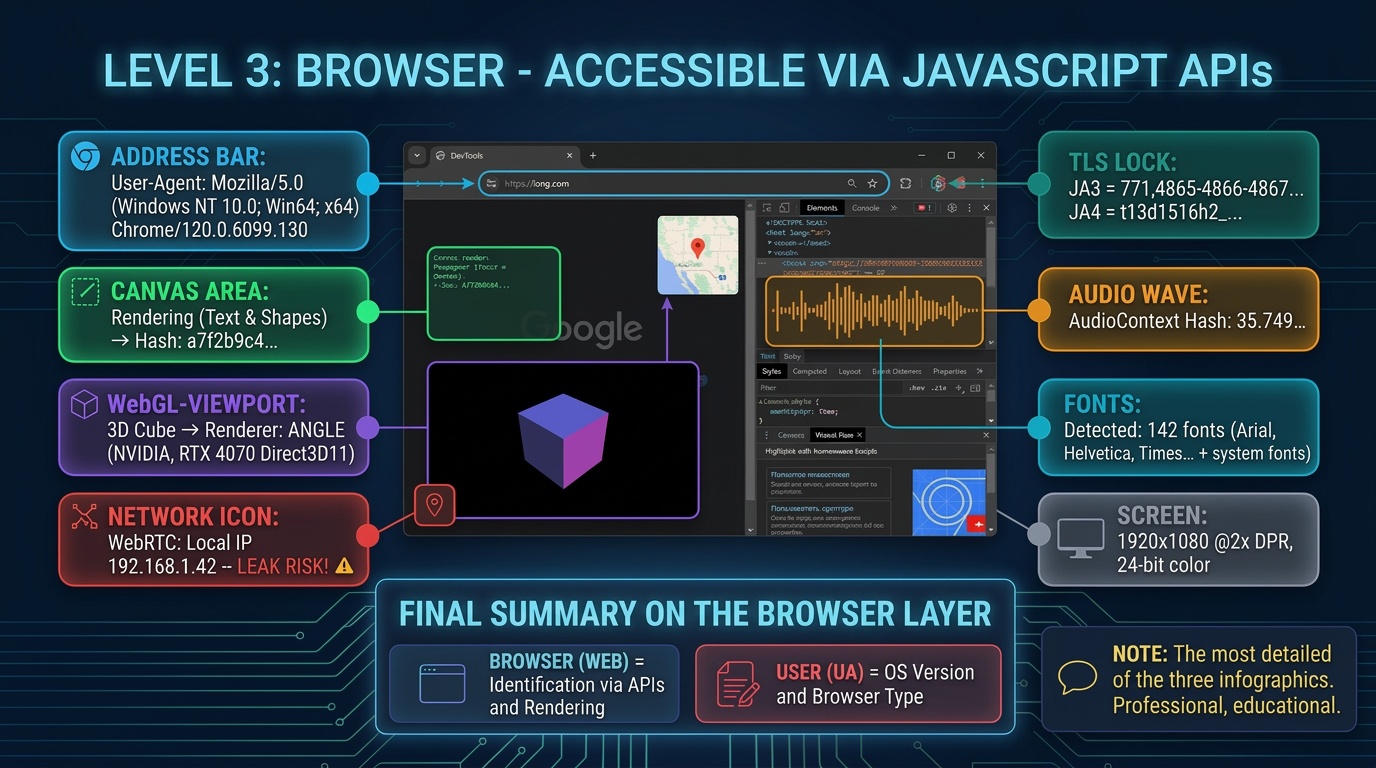
The most surface-level but most accessible layer. Browser fingerprints are collected by every website via JavaScript without any user permissions.
User-Agent
What it is: A string the browser sends to the server. Contains the browser name, version, OS, platform.
Example: Mozilla/5.0 (Windows NT 10.0; Win64; x64) AppleWebKit/537.36 Chrome/120.0.0.0 Safari/537.36
What it gives anti-fraud: User-Agent is the first parameter checked. But spoofing is trivial, so anti-fraud compares it against the browser's actual capabilities.
Client Hints (UA-CH): The modern replacement for classic User-Agent. Chromium-based browsers send structured data via Sec-CH-UA-* HTTP headers. This gives anti-fraud cleaner data and makes spoofing harder.
Canvas Fingerprint
What it is: An identification technique via graphics rendering. The browser draws an invisible element (text, shapes, gradients) on an HTML5 Canvas, then the result is converted to a hash. Due to differences in GPU, drivers, and settings, the hash is unique for each hardware and software combination.
What it gives anti-fraud: Canvas fingerprint is one of the most widely used methods. Works passively, requires no permissions, provides high entropy.
WebGL Fingerprint
What it is: Canvas equivalent through 3D rendering. It reveals:
- Renderer — GPU model (e.g.
ANGLE (NVIDIA GeForce RTX 3070)) - Vendor — manufacturer
- Rendering result — hash of the 3D scene
- Extensions — list of supported WebGL extensions
What it gives anti-fraud: WebGL renderer is a direct pointer to the GPU. If the Canvas hash doesn't match the declared GPU — conflict.
WebRTC
What it is: A technology for peer-to-peer communications. Side effect: can reveal local and public IP addresses, even with VPN.
What it gives anti-fraud: Real IP leak via WebRTC is one of the most well-known deanonymization vectors.
TLS Fingerprint (JA3 / JA4)
What it is: When establishing an HTTPS connection, the browser sends a ClientHello — a set of ciphers, extensions, and protocol versions. The combination creates a TLS fingerprint.
What it gives anti-fraud: TLS fingerprint works at the network level — it cannot be spoofed from JS. If User-Agent says "Chrome 120" but the TLS fingerprint is from a Python script — automation is obvious.
AudioContext Fingerprint
What it is: Canvas equivalent but through the audio subsystem. The browser generates sound via the AudioContext API; the result hash depends on audio drivers and hardware.
What it gives anti-fraud: AudioContext is a "silent" identifier: the user hears nothing.
Fonts (via Browser)
What it is: A browser technique for detecting fonts: a script renders test text and compares sizes against a fallback font.
What it gives anti-fraud: Presence of Arial Hebrew and Geeza Pro indicates macOS; Calibri and Consolas indicate Windows with Office.
Screen Resolution and Device Pixel Ratio
What it is: Screen resolution, working area size, DPR — the ratio of physical to CSS pixels.
What it gives anti-fraud: Non-standard resolutions and DPR are VM or automation markers.
Navigator Properties
What it is: The navigator object contains dozens of properties: language, hardwareConcurrency, deviceMemory, platform, maxTouchPoints, connection.
What it gives anti-fraud: Combined, properties form a "device profile." Mismatches — e.g. hardwareConcurrency: 2 with a declared i9 (24 cores) — are a direct flag.
How Identifiers Work Together: Cross-Check Analysis
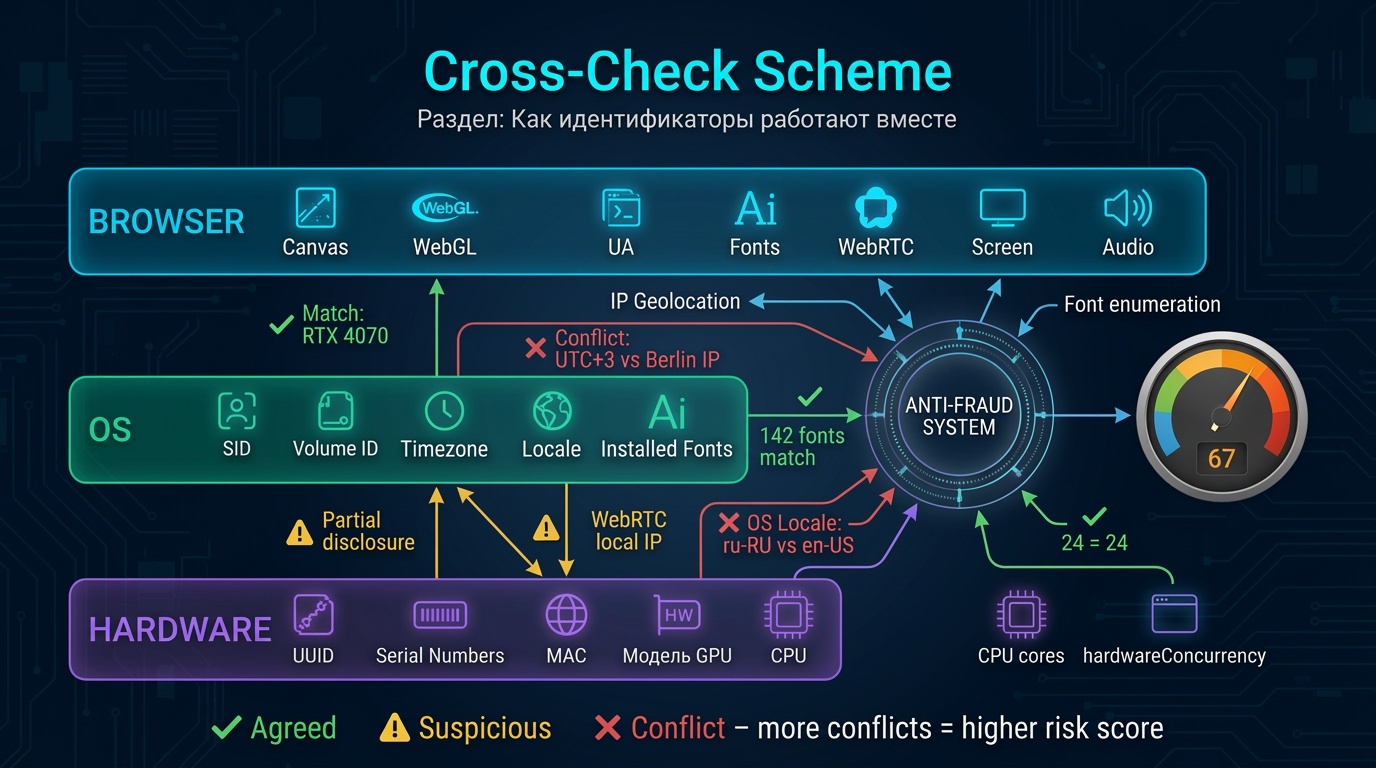
Anti-fraud systems don't rely on one parameter. They build a correlation graph — linking all available identifiers and looking for contradictions between layers.
Cross-Check Examples
| Check | What Is Compared | What Reveals Spoofing |
|---|---|---|
| GPU vs Canvas | WebGL renderer vs Canvas hash | Hash doesn't match declared GPU model |
| UA vs TLS | User-Agent vs JA3/JA4 | TLS fingerprint from different browser or automation |
| Timezone vs IP | System timezone vs IP geolocation | Moscow timezone with Berlin IP |
| Fonts vs OS | Font set vs declared OS | macOS fonts on device with Windows UA |
| CPU vs Navigator | hardwareConcurrency vs deviceMemory | 2 cores and 0.5 GB RAM on desktop |
| WebRTC vs Proxy | Local IP vs public IP | Real IP leak with proxy enabled |
| Screen vs Platform | Resolution vs device type | Mobile resolution on desktop UA |
Key principle: the more layers are consistent, the lower the risk score. Spoofing Canvas alone achieves nothing if fonts, GPU, and timezone contradict each other.
Summary Table: All Digital Fingerprint Identifiers
| Identifier | Layer | Entropy | Stability | Browser Spoofing |
|---|---|---|---|---|
| System UUID | Hardware | High | Permanent | Impossible |
| Serial Numbers | Hardware | High | Permanent | Impossible |
| MAC-адрес | Hardware | High | Configurable | Partial (WebRTC) |
| GPU model | Hardware | Medium | Permanent | JS spoofing (detectable) |
| Windows SID | OS | High | Until reinstall | Impossible |
| Volume ID | OS | High | Until formatting | Impossible |
| Machine ID | OS | High | Until reinstall | Impossible |
| Шрифты | OS / Browser | High | Semi-stable | JS (partial) |
| Timezone | OS | Low | Configurable | JS (легко) |
| User-Agent | Browser | Medium | Changes | Easy |
| Canvas | Browser | High | Stable | JS (детектится) |
| WebGL | Browser | High | Stable | JS (детектится) |
| WebRTC | Browser / Network | High | Depends on network | Disable/spoof |
| TLS (JA3/JA4) | Network | High | Tied to version | Impossible из JS |
| AudioContext | Browser | Medium | Stable | JS (partial) |
| Screen / DPR | Browser | Low | Stable | JS (легко) |
| Navigator props | Browser | Medium | Stable | JS (детектится) |
How Antidetect System Spoofs Each Identifier
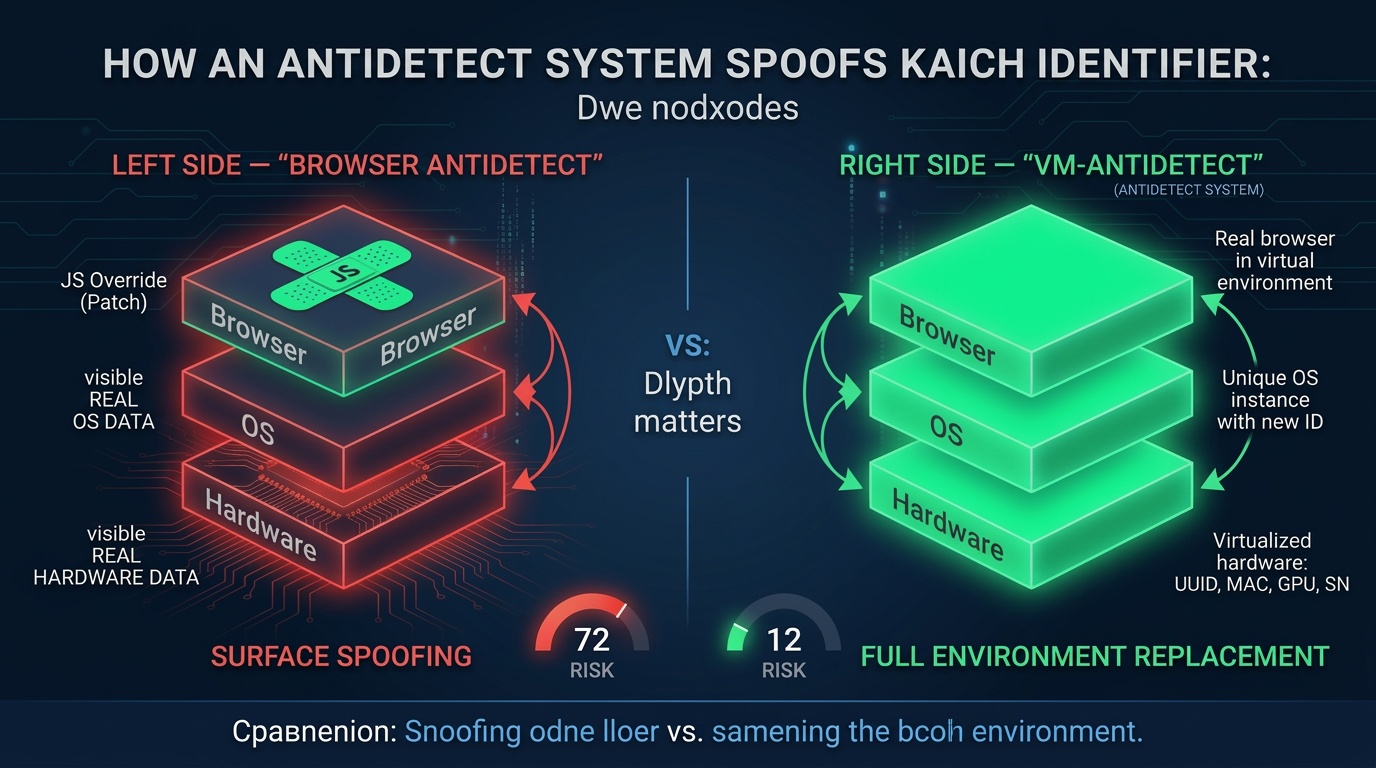
Browser antidetects only work with the top layer. Virtualization-based Antidetect System solves the problem architecturally — each profile exists in a separate VM where all layers are consistent.
| Identifier | Browser Antidetect | Antidetect System (VM) |
|---|---|---|
| System UUID | Not spoofed | Unique UUID per VM |
| Serial Numbers | Not spoofed | Virtualized SNs for all components |
| MAC Address | WebRTC blocking only | Unique MAC with valid OUI |
| GPU (WebGL) | JS string spoofing (conflict) | Virtual GPU + consistent rendering |
| Windows SID | Not spoofed | Unique SID on VM creation |
| Volume ID | Not spoofed | Unique Volume ID per disk |
| Machine ID | Not spoofed | Generated on environment creation |
| Fonts | Partial JS blocking | Real guest OS fonts |
| Canvas / WebGL hash | Noise (detectable) | Natural virtual GPU rendering |
| TLS (JA3/JA4) | Not spoofed (network level) | Real browser = real TLS |
| AudioContext | JS spoofing with artifacts | Virtual audio subsystem |
| WebRTC (IP leak) | Blocking or spoofing | VM's own network stack |
The key advantage of the VM approach: the browser inside the virtual machine doesn't "deceive" — it honestly reports its environment's parameters. No conflicts between layers arise because all layers belong to one consistent environment.
FAQ: Common Questions About Digital Fingerprints
Can you completely avoid a digital fingerprint? No. Any device with a browser generates a fingerprint. Even in incognito mode. The goal is not to "zero out" the fingerprint but to make it look plausible and non-contradictory.
Which parameter is most important for anti-fraud? No single one. Anti-fraud works with parameter combinations and consistency between layers. Canvas fingerprint, WebGL renderer, and TLS fingerprint are among the most significant.
Does anti-fraud detect virtual machines? Some try. But the fact of VM itself is not a death sentence. Environment plausibility matters more. A properly configured VM usually gets a lower risk score than a browser profile with conflicts.
How does Canvas fingerprint differ from WebGL fingerprint? Canvas is built on 2D rendering — the hash depends on GPU, drivers, and fonts. WebGL uses 3D rendering and additionally reveals the exact GPU model. Both methods complement each other.
Conclusion
A digital fingerprint is not one parameter but a multi-layered identification system operating at the hardware, operating system, and browser levels. Anti-fraud systems analyze dozens of parameters simultaneously and look for inconsistencies between layers.
Understanding which identifiers are collected and how they're connected is the first step toward competent work with digital anonymity. Spoofing individual parameters at the browser level solves only part of the problem. For full consistency, you need to control all layers — from BIOS UUID to TLS fingerprint.
This is exactly the approach Antidetect System implements through virtualization — each profile exists in its own digital environment where all identifiers are generated consistently.
VM-based antidetect. 300,000+ unique identity combos. Free edition available.
